How to Configure VPRN on Nokia Service Routers?
In this post, we will focus on the configuration of VPRN Service on Nokia (Alcatel-Lucent) Service Routers. Here, We will use Alcatel-Lucent 7450 Service Router as a PE Router. Our Provider Routers will be Nokia (Alcatel-Lucent) 7750 Service Routers. But, there will be no configuration on P routers in this post. We assume that we have a proper Provider MPLS Core.
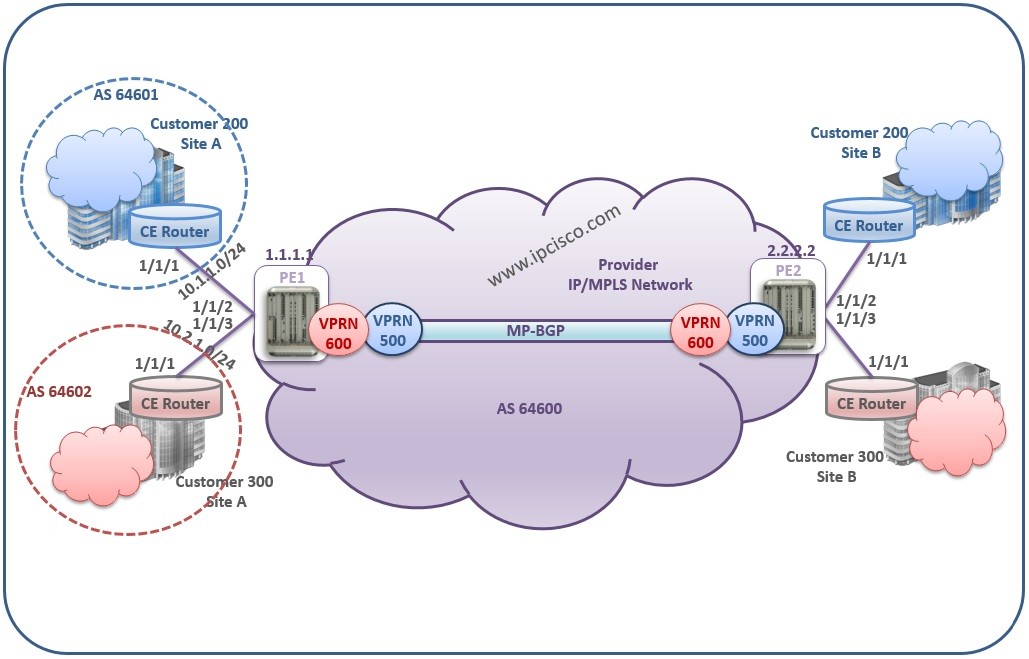
For VPRN Configuration, we will use the below topology:

VPRN Example Topology
To Test Yourself on Nokia Services, You Can Also Check Nokia Services Quiz Page
PE1 PE1# configure router autonomous-system 64600 PE1# exit all PE1# configure router bgp PE1>config>router>bgp# group “multi-bgp” PE1>config>router>bgp>group$ family vpn-ipv4 PE1>config>router>bgp>group$ peer-as 64600 PE1>config>router>bgp>group$ neighbour 2.2.2.2 PE1>config>router>bgp>group>neighbour$ local-address 1.1.1.1 PE1>config>router>bgp>group>neighbour$ exit all PE1> config>router>bgp# info group “multi-bgp” family vpn-ipv4 peer-as 64600 neighbour 2.2.2.2 local-address 1.1.1.1 exit exit
PE2 PE2# configure router autonomous-system 64600 PE2# exit all PE2# configure router bgp PE2>config>router>bgp# group “multi-bgp” PE2>config>router>bgp>group$ family vpn-ipv4 PE2>config>router>bgp>group$ peer-as 64600 PE2>config>router>bgp>group$ neighbour 1.1.1.1 PE2>config>router>bgp>group>neighbour$ local-address 2.2.2.2 PE2>config>router>bgp>group>neighbour$ exit all PE2> config>router>bgp# info group “multi-bgp” family vpn-ipv4 peer-as 64600 neighbour 1.1.1.1 local-address 2.2.2.2 exit exit To verify this, you can use, “show router bgp neighbour” command.
As an example for routing protocol configuration, I will give the configuration between Customer Routers and PE1 router. PE1# configure service vprn 500 PE1>config>service>vprn# autonomous system 64600 PE1>config>service>vprn# bgp PE1>config>service>vprn>bgp$ neighbour 10.1.1.2 PE1>config>service>vprn>bgp>neighbour$ peer-as 64601 PE1>config>service>vprn>bgp>neighbour$ exit all PE1# configure service vprn 600 PE1>config>service>vprn# autonomous system 64600 PE1>config>service>vprn# bgp PE1>config>service>vprn>bgp$ neighbour 10.2.1.2 PE1>config>service>vprn>bgp>neighbour$ peer-as 64602 PE1>config>service>vprn>bgp>neighbour$ exit all CE1>config>router# bgp CE1>config>router>bgp$ autonomous system 64601 CE1>config>router>bgp$ neighbour 10.1.1.1 CE1>config>router>bgp>neighbour$ peer-as 64600 CE1>config>router>bgp>neighbour$ exit all CE2>config>router# bgp CE1>config>router>bgp$ autonomous system 64602 CE2>config>router>bgp$ neighbour 10.2.1.1 CE2>config>router>bgp>neighbour$ peer-as 64600 CE2>config>router>bgp>neighbour$ exit all In our example MP-BGP will be used between PE routers. Between CE and PE routers BGP will be used. Here, any other routing protocol can be used. But we prefer BGP. So CE and PE are BGP peers.
2.Create VPRN Services associated with Customer ID. PE1# configure service PE1>config>service> vprn 500 customer 200 create PE1>config>service>vprn$ description “VPRN Service of Customer 500” PE1>config>service>vprn$ router-id 1.1.1.1 PE1>config>service>vprn$ exit PE1>config>service# vprn 600 customer 300 create PE1>config>service>vprn$ description “VPRN Service of Customer 600” PE1>config>service>vprn$ router-id 1.1.1.1 PE1>config>service>vprn$ exit
3.Configure Route Distinguisher and Route Target [sc name=”ContentRMessage”]
To Test Yourself on Nokia Services, You Can Also Check Nokia Services Quiz Page
MP-BGP and BGP Configuration between
To Configure VPRN, firstly routing protocol configuration must be done. Then MP-BGP must be enabled between PEs. Firstly let’s cofigure MP-BGP.PE1 PE1# configure router autonomous-system 64600 PE1# exit all PE1# configure router bgp PE1>config>router>bgp# group “multi-bgp” PE1>config>router>bgp>group$ family vpn-ipv4 PE1>config>router>bgp>group$ peer-as 64600 PE1>config>router>bgp>group$ neighbour 2.2.2.2 PE1>config>router>bgp>group>neighbour$ local-address 1.1.1.1 PE1>config>router>bgp>group>neighbour$ exit all PE1> config>router>bgp# info group “multi-bgp” family vpn-ipv4 peer-as 64600 neighbour 2.2.2.2 local-address 1.1.1.1 exit exit
PE2 PE2# configure router autonomous-system 64600 PE2# exit all PE2# configure router bgp PE2>config>router>bgp# group “multi-bgp” PE2>config>router>bgp>group$ family vpn-ipv4 PE2>config>router>bgp>group$ peer-as 64600 PE2>config>router>bgp>group$ neighbour 1.1.1.1 PE2>config>router>bgp>group>neighbour$ local-address 2.2.2.2 PE2>config>router>bgp>group>neighbour$ exit all PE2> config>router>bgp# info group “multi-bgp” family vpn-ipv4 peer-as 64600 neighbour 1.1.1.1 local-address 2.2.2.2 exit exit To verify this, you can use, “show router bgp neighbour” command.
As an example for routing protocol configuration, I will give the configuration between Customer Routers and PE1 router. PE1# configure service vprn 500 PE1>config>service>vprn# autonomous system 64600 PE1>config>service>vprn# bgp PE1>config>service>vprn>bgp$ neighbour 10.1.1.2 PE1>config>service>vprn>bgp>neighbour$ peer-as 64601 PE1>config>service>vprn>bgp>neighbour$ exit all PE1# configure service vprn 600 PE1>config>service>vprn# autonomous system 64600 PE1>config>service>vprn# bgp PE1>config>service>vprn>bgp$ neighbour 10.2.1.2 PE1>config>service>vprn>bgp>neighbour$ peer-as 64602 PE1>config>service>vprn>bgp>neighbour$ exit all CE1>config>router# bgp CE1>config>router>bgp$ autonomous system 64601 CE1>config>router>bgp$ neighbour 10.1.1.1 CE1>config>router>bgp>neighbour$ peer-as 64600 CE1>config>router>bgp>neighbour$ exit all CE2>config>router# bgp CE1>config>router>bgp$ autonomous system 64602 CE2>config>router>bgp$ neighbour 10.2.1.1 CE2>config>router>bgp>neighbour$ peer-as 64600 CE2>config>router>bgp>neighbour$ exit all In our example MP-BGP will be used between PE routers. Between CE and PE routers BGP will be used. Here, any other routing protocol can be used. But we prefer BGP. So CE and PE are BGP peers.
VPRN Configuration
1.Create Customer. PE1# configure service customer 200 create PE1>config>service>cust# description “Our VPRN Customer 1” PE1>config>service> cust # exit PE1>config>service# customer 300 create PE1>config>service> cust # description “Our VPRN Customer 2” PE1>config>service> cust # exit all2.Create VPRN Services associated with Customer ID. PE1# configure service PE1>config>service> vprn 500 customer 200 create PE1>config>service>vprn$ description “VPRN Service of Customer 500” PE1>config>service>vprn$ router-id 1.1.1.1 PE1>config>service>vprn$ exit PE1>config>service# vprn 600 customer 300 create PE1>config>service>vprn$ description “VPRN Service of Customer 600” PE1>config>service>vprn$ router-id 1.1.1.1 PE1>config>service>vprn$ exit
3.Configure Route Distinguisher and Route Target [sc name=”ContentRMessage”]