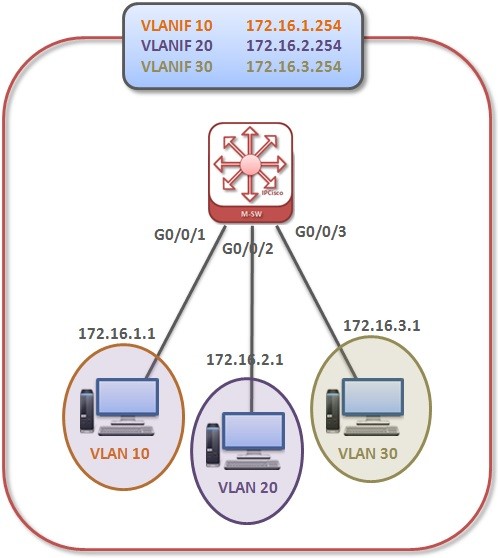
In this lesson we will learn Layer 3 VLAN Routing with VLAN Routing Huawei Configuration Example. We do not need any other Layer 3 device for VLAN Routing with Layer 3 Switch. Because Layer 3 switch can achieve this routing facility. Here, instead of subinterface, “VLANIF” is created for each VLAN.
Our example topology is below:
This VLANIF is used as the gateway of each VLAN. So, we have 3 VLANs and we need to create 3 VLANIF.
Let’s start the configuration.
You can download this configuration on Huawei eNSP Labs Page.
Layer 3 Switch Configuration for VLAN Routing
In our VLAN Routing Huawei Configuration Example, firstly we will configure, each interfaces of the L3 Switch. We will set these interfaces as access and we will give their default VLAN. [Huawei-Switch] interface GigabitEthernet0/0/1 [Huawei-Switch-GigabitEthernet0/0/1] port link-type access [Huawei-Switch-GigabitEthernet0/0/1] port default vlan 10 [Huawei-Switch-GigabitEthernet0/0/1] quit [Huawei-Switch] interface GigabitEthernet0/0/2 [Huawei-Switch-GigabitEthernet0/0/2] port link-type access [Huawei-Switch-GigabitEthernet0/0/2] port default vlan 20 [Huawei-Switch-GigabitEthernet0/0/2] quit [sc name=”ContentRMessage”]