


Packet Tracer VLAN Configuration
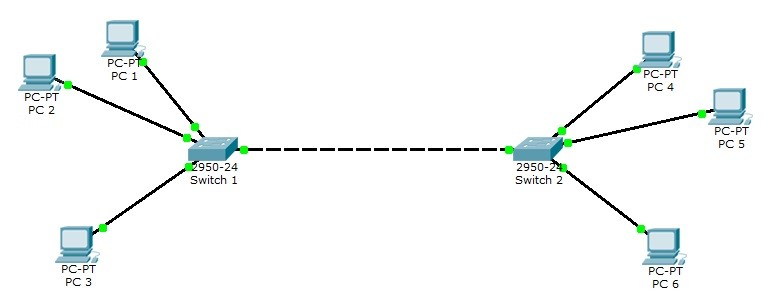
As an example, you can see a VLAN topology below. In this topology, 2 Cisco Catalyst 2950-24 switches and 6 PCs are used.
For all Packet Tracer Examples and Files, you can check Packet Tracer Labs Page.
PC Configurations
For our VLAN Configuration example, we will set our PC IPaddresses as below. These ip addresses will be required at the end of this configuration example to test our configuration. PC 1 –> 192.168.1.2 VLAN 2 PC 2 –> 192.168.1.3 VLAN 2 PC 3 –> 192.168.1.4 VLAN 3 PC 4 –> 192.168.1.6 VLAN 3 PC 5 –> 192.168.1.7 VLAN 3 PC 6 –> 192.168.1.8 VLAN 2VLAN Configuration on Switch 1
After PC IP configurations, now, we can start our VLAN Packet Tracer Configuration steps. Here, we will follow the below steps:- We will set access ports that will access specific VLANs. We will do this with “switchport mode access” command under these interfaces.
- We will also set the VLAN, that this port will access.
- After that, we will set the trunk port that will carry multiple VLANs with “swithcport mode trunk” command.
- Then we will also set this port with “no negotiate” command to prevent negotiation about the port role.
- Laslty, we will set the allowed VLANs with “switchport trunk allowed vlan” command on this trunk and save our configuration.
VLAN Configuration on Switch 2
After configuring the first switch, we will configure switch 2 similar to switch 1 as below. Switch 2(config)# interface fastEthernet 0/2 Switch 2(config-if)# switchport mode access Switch 2(config-if)# switchport access vlan 3 Switch 2(config)# interface fastEthernet 0/3 Switch 2(config-if)# switchport mode access Switch 2(config-if)# switchport access vlan 2 Switch 2(config)# interface fastEthernet 0/4 Switch 2(config-if)# switchport mode access Switch 2(config-if)# switchport access vlan 2 Switch 2(config)# interface fastEthernet 0/1 Switch 2(config-if)# switchport mode trunk Switch 2(config-if)# switchport nonegotiate Switch 2(config-if)# switchport trunk allowed vlan 2-4 Switch 2# copy running-config startup-configChecking VLAN Configuration
Our last step of VLAN Packet Tracer Example is configuration verification. to verify our VLAN Packet Tracer Configuration, we will use verification commands like “show vlan brief“, “show interfaces“, “show interfaces trunk” etc. Switch# show vlan brief VLAN Name Status Ports —- ——————————– ——— ——————————- 1 default active Fa0/5, Fa0/6, Fa0/7, Fa0/8 Fa0/9, Fa0/10, Fa0/11, Fa0/12 Fa0/13, Fa0/14, Fa0/15, Fa0/16 Fa0/17, Fa0/18, Fa0/19, Fa0/20 Fa0/21, Fa0/22, Fa0/23, Fa0/24 2 VLAN0002 active Fa0/2, Fa0/3 3 VLAN0003 active Fa0/4 1002 fddi-default active 1003 token-ring-default active 1004 fddinet-default active 1005 trnet-default activeFor all Packet Tracer Examples and Files, you can check Packet Tracer Labs Page.
[sc name=”ContentRMessage”]




