VLAN Frame Tagging Protocols (ISL and dot1.q)
In this lesson, we will learn
VLAN Frame Tagging Protocols detailly. In the next lessons, you can also check
Cisco VLAN Configuration Examples.
What are these
VLAN Frame Tagging Protocols? Let’s see each of them.
There are two types of frame tagging protocols. These are :
– ISL(Inter-Switch Link)
– dot1Q (or IEEE 802.1Q)
These protocols can be configured
manually or negotiated by
DTP(Dynamic Trunking Protocol).
DTP is a
Cisco proprietary protocol. For VLAN Tagging Cisco, DTP can be used.
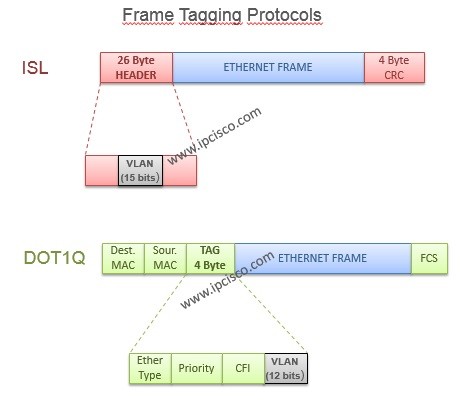
ISL encapsulate the frame with a
header (26 bytes) and trailer
(4 bytes). So ISL increases the size of a frame
30 bytes. This protocol is a
Cisco proprietary protocol and it is not supported on new Cisco devices. ISL support 1000
VLAN on a truk port.
You can configure
ISL on Cisco switches like below:
Switch(config)# interface fa0/0
Switch(config-if)# switchport trunk encapsulation isl
Dot1Q (or IEEE 802.1Q) is the industry standart. So with this frame tagging protocol, you can trunk different vendors’ switches.
Dot1Q modifies the
layer-2 header and add
4-byte VLAN tag into it. Because of this process, the frame
CRC value is calculated again. Dot1.q support 4096 VLAN s on a trunk.
You can configure
dot1.q on Cisco switches like below:
Switch(config)# interface fa0/0
Switch(config-if)# switchport trunk encapsulation dot1.q
The normal frame size is
1514 bytes. With ISL, this value increate 30 bytes and the frame become giant to other vendor’s switches. But with dot1.q, the frame size become 1514 to 1518. And this value is supported by all other vendors’ switches.
 VLAN Frame Tagging Protocols, ISL and Dot1q
Both end must be configure with the same tagging portocol.
[sc name=”ContentRMessage”]
VLAN – Part 1
VLAN – Part 2 (VLAN Assignments and VLAN Port Types)
VLAN – Part 3 (VLAN Frame Tagging Protocols, ISL and Dot1.q)
VLAN – Part 4 (How to Configure Cisco VLANs)
VLAN – Part 5 (Packet Tracer VLAN Configuration Example)
VLAN Configuration on Huawei Switches
Private VLANs
Private VLAN Cisco Configuration
What is Protected Port?