How to Configure VLAN on Huawei Switches?
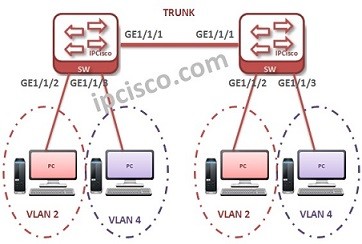
VLAN Configuration on Huawei switch is not too different than Cisco VLAN Configuration. But there are some differences. In this lesson, we will see the VLAN configuration steps on Huawei devices. For our example, we will use the below VLAN topology.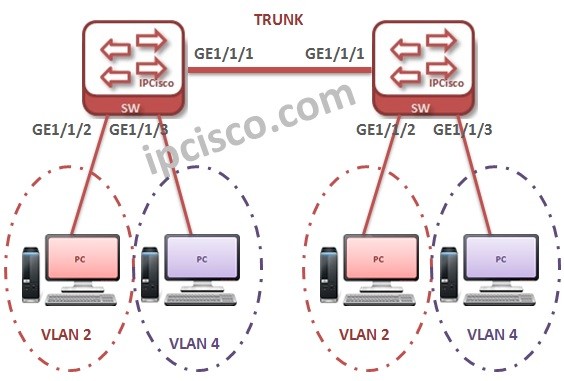
You can download thic configuration on Huawei eNSP Labs Page.
We will configure each switch for VLANs one by one.
Firstly, we will create the VLANs. We can create VLANs one by one or in a batch. Beside, we will add the description of the VLAN.
system-view
Enter system view, return user view with Ctrl+Z.
[IPCisco-HCNA-1] vlan 2
[IPCisco-HCNA-1-vlan2] description Sales
[IPCisco-HCNA-1-vlan2] quit
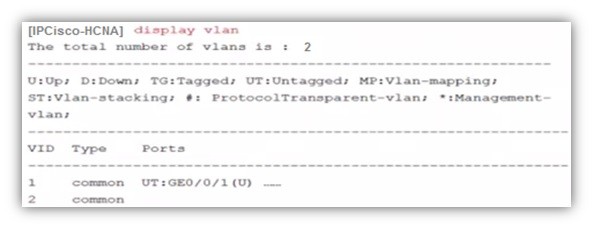 [IPCisco-HCNA] vlan batch 4 to 6
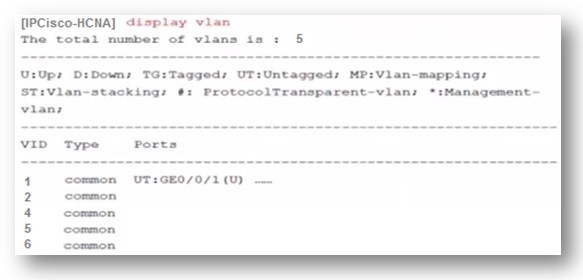
[IPCisco-HCNA] vlan batch 4 to 6
Now, lets configure the ports. Here, we will configure GigabitEthernet 1/1/1 as trunk.And our access ports will be GigabitEthernet 1/1/2 and GigabitEthernet 1/1/3. We will configure this with the command “port link-type“.
[IPCisco-HCNA-1] interface GigabitEthernet 1/1/1
[IPCisco-HCNA-1-GigabitEthernet 1/1/1] port link-type trunk
[IPCisco-HCNA-1-GigabitEthernet 1/1/1] interface GigabitEthernet 1/1/2
[IPCisco-HCNA-1-GigabitEthernet 1/1/2] port link-type access
[IPCisco-HCNA-1-GigabitEthernet 1/1/2] interface GigabitEthernet 1/1/3
[IPCisco-HCNA-1-GigabitEthernet 1/1/3] port link-type access
[IPCisco-HCNA-1-GigabitEthernet 1/1/3] quit
It is time to add ports to the created VLANs. We will add GigabitEthernet 1/1/2 to VLAN 2 and GigabitEthernet 1/1/3 to VLAN 4.
[sc name=”ContentRMessage”]