


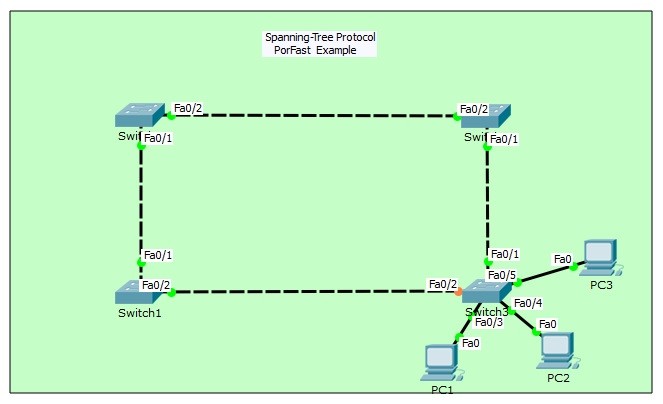
Packet Tracer STP Portfast Configuration
In STP (Spanning Tree Protocol) there are different states. These STP states are: Blocking State, Listenning State, Learning State and Forwarding State. With STP Portfast, Listenning State and Learning State are bypassed. With this configuration, ports rapidly goes to Forwarding State. The access ports of the switches that connect to hosts can configured with Spanning Tree Portfast. And with Portfast, the host ports rapidly goes to Forwarding State. Here, host means, PCs, Laptops, IP Phone and other user equipments.You can DOWNLOAD the Cisco Packet Tracer example with .pkt format At the End of This Lesson.
For all Packet Tracer Examples and Files, you can check Packet Tracer Labs Page.
For our Spanning Tree Portfast configuration, we will use the below topology on Packet Tracer. Here, we have four Cisco swithces in our Spanning Tree domain.

Switch# show spanning-tree VLAN0001 Spanning tree enabled protocol ieee Root ID Priority 32769 Address 0006.2A11.24CC Cost 38 Port 1(FastEthernet0/1) Hello Time 2 sec Max Age 20 sec Forward Delay 15 sec Bridge ID Priority 32769 (priority 32768 sys-id-ext 1) Address 000A.4139.1675 Hello Time 2 sec Max Age 20 sec Forward Delay 15 sec Aging Time 20 Interface Role Sts Cost Prio.Nbr Type —————- —- — ——— ——– ——————————– Fa0/1 Root FWD 19 128.1 P2p Fa0/2 Altn BLK 19 128.2 P2p Fa0/3 Desg FWD 19 128.3 P2p Fa0/4 Desg LSN 19 128.4 P2p Fa0/5 Desg FWD 19 128.5 P2p
Switch# show spanning-tree VLAN0001 Spanning tree enabled protocol ieee Root ID Priority 32769 Address 0006.2A11.24CC Cost 38 Port 1(FastEthernet0/1) Hello Time 2 sec Max Age 20 sec Forward Delay 15 sec Bridge ID Priority 32769 (priority 32768 sys-id-ext 1) Address 000A.4139.1675 Hello Time 2 sec Max Age 20 sec Forward Delay 15 sec Aging Time 20 Interface Role Sts Cost Prio.Nbr Type —————- —- — ——— ——– ——————————– Fa0/1 Root FWD 19 128.1 P2p Fa0/2 Altn BLK 19 128.2 P2p Fa0/3 Desg FWD 19 128.3 P2p Fa0/4 Desg LRN 19 128.4 P2p Fa0/5 Desg FWD 19 128.5 P2p
Switch# show spanning-tree VLAN0001 Spanning tree enabled protocol ieee Root ID Priority 32769 Address 0006.2A11.24CC Cost 38 Port 1(FastEthernet0/1) Hello Time 2 sec Max Age 20 sec Forward Delay 15 sec Bridge ID Priority 32769 (priority 32768 sys-id-ext 1) Address 000A.4139.1675 Hello Time 2 sec Max Age 20 sec Forward Delay 15 sec Aging Time 20 Interface Role Sts Cost Prio.Nbr Type —————- —- — ——— ——– ——————————– Fa0/1 Root FWD 19 128.1 P2p Fa0/2 Altn BLK 19 128.2 P2p Fa0/3 Desg FWD 19 128.3 P2p Fa0/4 Desg FWD 19 128.4 P2p Fa0/5 Desg FWD 19 128.5 P2p
For all Packet Tracer Examples and Files, you can check Packet Tracer Labs Page.
Now, let’s configure Portfast on all access interfaces. For this, we will use “spanning-tree portfast default” command. This command enables STP Portfast, on all access interfaces.
Switch (config)# spanning-tree portfast defaultAfter Portfast configuration on switch, let’s check the states again by deleting and reconnecting the cable of port Fa0/4. When we delete the cable that on fa0/4 on Packet Tracer, the port is also removed on “show spanning-tree”.
Switch# show spanning-tree VLAN0001 Spanning tree enabled protocol ieee Root ID Priority 32769 Address 0006.2A11.24CC Cost 38 Port 1(FastEthernet0/1) Hello Time 2 sec Max Age 20 sec Forward Delay 15 sec Bridge ID Priority 32769 (priority 32768 sys-id-ext 1) Address 000A.4139.1675 Hello Time 2 sec Max Age 20 sec Forward Delay 15 sec Aging Time 20 Interface Role Sts Cost Prio.Nbr Type —————- —- — ——— ——– ——————————– Fa0/1 Root FWD 19 128.1 P2p Fa0/2 Altn BLK 19 128.2 P2p Fa0/3 Desg FWD 19 128.3 P2p Fa0/5 Desg FWD 19 128.5 P2p When we connect the cable again, then the port immediatelly become up and go to the Forwarding State. Switch# %LINK-5-CHANGED: Interface FastEthernet0/4, changed state to up %LINEPROTO-5-UPDOWN: Line protocol on Interface FastEthernet0/4, changed state to up
Switch# show spanning-tree VLAN0001 Spanning tree enabled protocol ieee Root ID Priority 32769 Address 0006.2A11.24CC Cost 38 Port 1(FastEthernet0/1) Hello Time 2 sec Max Age 20 sec Forward Delay 15 sec Bridge ID Priority 32769 (priority 32768 sys-id-ext 1) Address 000A.4139.1675 Hello Time 2 sec Max Age 20 sec Forward Delay 15 sec Aging Time 20 Interface Role Sts Cost Prio.Nbr Type —————- —- — ——— ——– ——————————– Fa0/1 Root FWD 19 128.1 P2p Fa0/2 Altn BLK 19 128.2 P2p Fa0/3 Desg FWD 19 128.3 P2p Fa0/4 Desg FWD 19 128.4 P2p Fa0/5 Desg FWD 19 128.5 P2p
You can DOWNLOAD the Packet Tracer example with .pkt format HERE.
You can check the other Cisco Packet Tracer Examples below:
Common Cisco Router Configuration Example on Packet Tracer
Router DHCP Configuration Example on Packet Tracer
VTP Configuration Example on Packet Tracer
VLAN Configuration Example on Packet Tracer
STP Configuration Example on Packet Tracer
RSTP Configuration with Packet Tracer
STP Portfast Configuration with Packet Tracer
Inter VLAN Routing Configuration on Packet Tracer
Switch Virtual Interface (SVI) Configuration with Packet Tracer
BGP Configuration Example on Packet Tracer
Port Security Configuration Example on Packet Tracer
RIP Configuration Example on Packet Tracer
CDP Configuration Example on Packet Tracer
OSPF Area Types Example on Packet Tracer (Standard and Backbone Areas)
OSPF External Routes Example on Packet Tracer
OSPF Area Types Example on Packet Tracer (Stub, NSSA, Totally Stubby, Totally NSSA Areas)
Standard Access-List Example on Packet Tracer
Extended Access-List Example on Packet Tracer




