Portfast, Root Guard, BPDU Filter and BPDU Guard
The are various mechanims used with
STP to provide stable STP topology. In this lesson, we will focus on what are these
STP Mechanims and what they do to provide a stable STP Topology.
So, what are these
STP Convergence Mechanims? These STP Convergence Mechanims are given below:
- PortFast
- BPDU Guard
- BPDU Filter
- Root Guard
- Loop Guard
- Uplink Fast
- Bachbone Fast
- UDLD
Now, let’s talk about these
STP Convergence Mechanims one by one detailly.
PortFast
As we have discussed before, in
STP (Spanning Tree Protocol) there are
five port states. These Port States are :
- Blocking State
- Listening State
- Learning State
- Forwarding State
In an STP Topology, this Layer 2 convergence time, accessing from blocking to forwarding state,is 50 seconds. These 50 seconds are spend in the states like below:
- Blocking State : 20 seconds
- Listenning State : 15 seconds
- Learning State : 15 seconds
Total
50 seconds From
Blocking State to
Forwarding State.
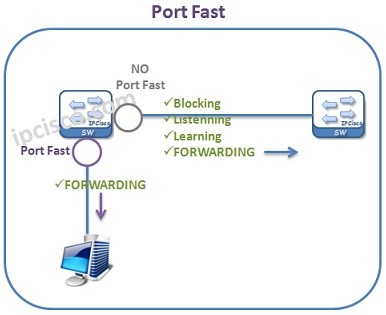
To reduce this time,
STP Portfast is used on the access ports connected to host devices like pc, laptops, printers, servers etc. With
STP Portfast, Blocking State, Listenning State and Learning State are bypassed. So, the ports enters the Forwarding State immediately.
STP Portfast is used on only access ports. It is not recommended to use SP Port Fast On Trunk Ports. Also on the port that is connected to another switch is not recommended. Because, such a connection can cause an unaccepted Layer 2 Loop.
To configure
STP Portfast Globally, you can use “
spanning-tree portfast default” command globally. This will configure all switch ports with PortFast and put all the switch ports into Forwarding rapidly. To configure PortFast on a specific interface, you can use “spanning-tree portfast” under this specific interface.
BPDU Guard
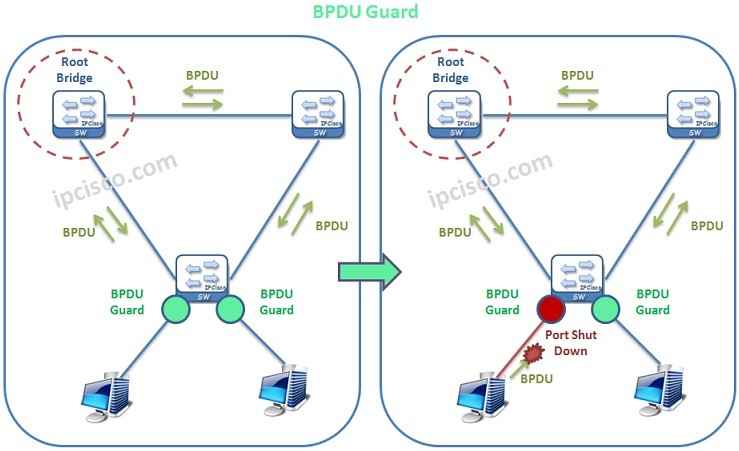
BPDU Guard is the mechanims that protect a port towards any BPDU. In other words, this mechanims avoid receiving BPDU packets. By doing this,
BPDU Guard provide the stability of STP Topology.
[sc name=”ContentRMessage”]