Huawei STP Configuration
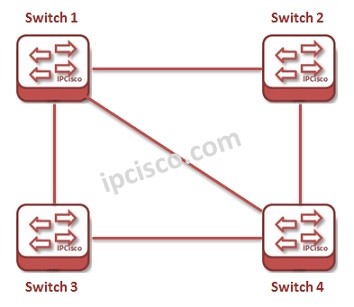
In this lessons, we will focus on STP (Spanning Tree Protocol) Configuration on Huawei Switches. For our Huawei STP Example, we will use the basic topology below. In another lesson, we will also learn Huawei RSTP Configuration.
Let’s start to configure STP on one of these Huawei Switches, Switch 1.
You can download thic configuration on Huawei eNSP Labs Page.
Enabling STP
By default, STP is enabled on Huawei switches. If it is not you can enable it with “stp enable” command. system-view [Huawei-Switch-1] stp enableSTP Mode
As we discusses in the STP Lesson, there are some different STP Modes. Huawei has three STP Modes. These are: • STP (Spanning Tree Protocol) • RSTP (Rapid Spanning Tree Protocol) • MSTP (Multiple Spanning Tree Protocol) Firstly, we will configure the mode of used STP. Here, we will select STP. [Huawei-Switch-1] stp mode ? mstp Multiple Spanning Tree Protocol (MSTP) mode rstp Rapid Spanning Tree Protocol (RSTP) mode stp Spanning Tree Protocol (STP) mode [Huawei-Switch-1] stp mode stpManual Root Bridge Selection
As a best configuration practice, selecting the Route Bridge manually is important. By doing this, you can determine the main STP switch and this can provide you many advantages. We can select Root Bridge manually in two ways. These ways are: • “Root Primary” command • Configure STP Priority value With “Root Primary” command, we can set a switch as Root Bridge. [Huawei-Switch-1] stp root primary The second way to manuplate Root Bridge Selection is configuring Priority value of the switch. When we configure the Higher Priority value in a switch, it will be selected as Root Bridge. The default priority value is 32768. Here the lowest value is 4096. [Huawei-Switch-1] stp priority 4096Path Cost Configuration
There are different path cost standards for STP. By default Huawei switches use 802.1T. We can change this if we want. [Huawei-Switch-1] stp pathcost-standard ? dot1d-1998 IEEE 802.1D-a998 dot1t IEEE 802.1T legacy Legacy [Huawei-Switch-1] dot1t There is a reference value for interfaces that is used for link selection. This reference value is called “cost“. We can manually set costs of the interfaces. [Huawei-Switch-1] interface GigabitEthernet 0/0/1 [Huawei-Switch-1-GigabitEthernet0/0/1] stp cost 20000 [Huawei-Switch-1] interface GigabitEthernet 0/0/2 [Huawei-Switch-1-GigabitEthernet0/0/1] stp cost 10000Port Priority Configuration
There are also priority values for the ports that affect the role of the port. For example, if you would like to block a port then you can use a higher port priority on a port. The default value of Port Priority is 128. [Huawei-Switch-1] interface GigabitEthernet 0/0/1 [Huawei-Switch-1-GigabitEthernet0/0/1] stp port priority 150Root Protection
As a protection mechanism for Root Bridge, we can configure the ports of root bridge with “stp root-protection”. [sc name=”ContentRMessage”]