Static Routing on Juniper Routers

juniper-static-routing

Static Routing on Juniper Routers

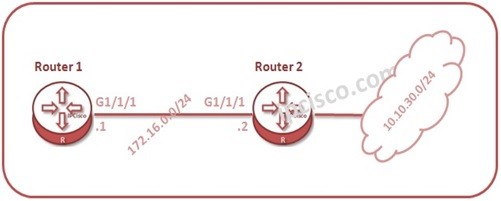
Static Routing is the manual route configuration on routers. In JUNOS, static route configuration is done similarly with other Network operating systems. After “static route” command, the destination network is mentioned and then next-hop ip address is given. This static route definition is done under “routing-options” hierarchy in JUNOS. For our JUNOS Static Route Example, we will use the below simple topology.

juniper-static-routing
juniper-junos@Kosem> configure [edit] juniper-junos@Kosem# edit routing-options [edit routing-options] juniper-junos@Kosem# set static route 10.10.10.0/24 next-hop 172.16.1.1 [edit routing-options] juniper-junos@Kosem# show static { route 10.10.10.0/24 next-hop 172.16.1.1; } [edit routing-options] juniper-junos@Kosem# commit commit completeTo show the configured static route: [sc name=”ContentRMessage”] Other Static Routing Lessons on Other Vendors IPv4 Static Route Configuration on Cisco IPv6 Static Route Configuration on Cisco IPv6 Default Route Configuration on Cisco IPv4 Static Route Configuration on Juniper IPv6 Static Route Configuration on Juniper IPv6 Static Route Configuration on Juniper IPv4 Static Route Configuration on Nokia IPv4 Default and Floating Route Configuration on Nokia St Route Configuratioatic Route on Huawei and Load Balancing IPv4 Default and Floating Route Configuration on Huawei

Leave A Reply

Your email address will not be published. Required fields are marked *

You May Also Like

Networking Certifications has served as a stepping stone for those seeking to advance their careers in Networking, h they are...
Dynamic Routing Protocol   Dynamic Routing is the routing process that is done via a Routing Protocols in networking. The...
DNS Overview DNS (Domain Name System) is a common protocol that is used to translate hostnames to the IP addresses....
In this configuration example, we will configure IPv6 on Juniper Routers. For our Juniper IPv6 Configuration Example, we will use...