RIPv2 is an old
Routing Protocol but it is the first Routing Protocol that all Network Engineers meet first. In this lesson, we will configure
RIPv2 on
Huawei Routers.
For our
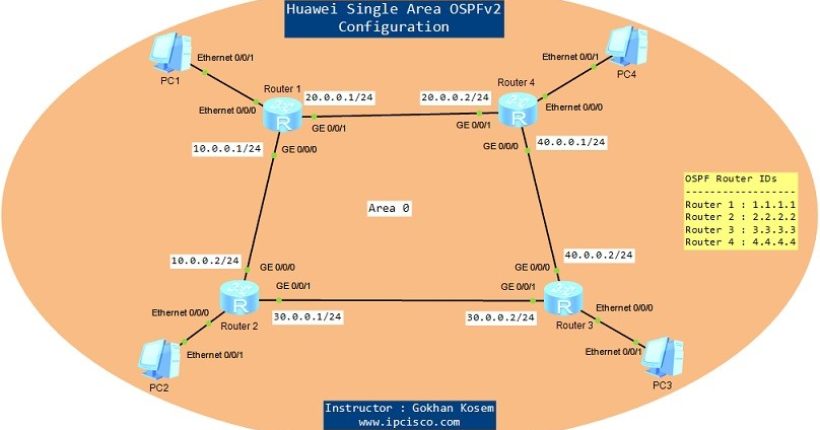
Huawei RIPv2 Configuration Example, we will use the below topology consist of three routers. Here, indirectly connected networks will be learned via
RIPv2.
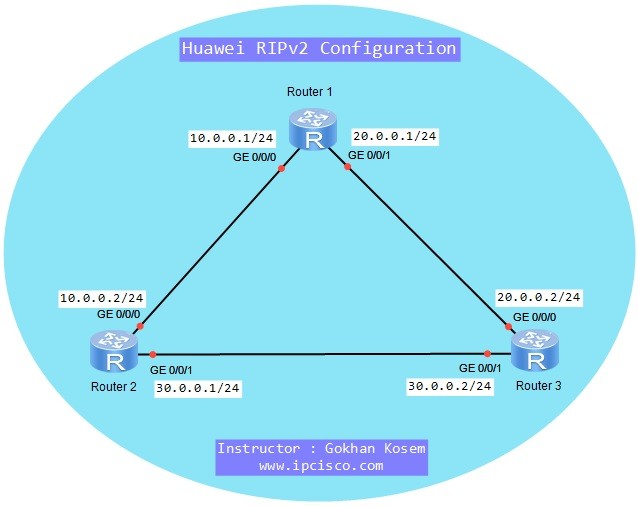
We will follow the following steps for our Huawei RIPv2 Configuration Example:
1) Interface configurations of the routers.
2) RIPv2 Configuration on the routers.
3) RIPv2 Configuration Verification
Huawei Router Interface Configurations
We will configure the Router interfaces as above IP addresses on the topology.
Huawei Router 1
< Huawei-Router-1> system-view
[Huawei-Router-1] interface GigabitEthernet 0/0/0
[Huawei-Router-1- GigabitEthernet0/0/0] ip address 10.0.0.1 ip address.1 24
[Huawei-Router-1- GigabitEthernet0/0/0] undo shutdown
[Huawei-Router-1- GigabitEthernet0/0/0] quit
[Huawei-Router-1] interface GigabitEthernet 0/0/1
[Huawei-Router-1- GigabitEthernet0/0/1] ip address 20.0.0.1 ip address.1 24
[Huawei-Router-1- GigabitEthernet0/0/1] undo shutdown
[Huawei-Router-1- GigabitEthernet0/0/1] quit
Huawei Router 2
< Huawei-Router-2> system-view
[Huawei-Router-2] interface GigabitEthernet 0/0/0
[Huawei-Router-2- GigabitEthernet0/0/0] ip address 10.0.0.2 ip address.1 24
[Huawei-Router-2- GigabitEthernet0/0/0] undo shutdown
[Huawei-Router-2- GigabitEthernet0/0/0] quit
[Huawei-Router-2] interface GigabitEthernet 0/0/1
[Huawei-Router-2- GigabitEthernet0/0/1] ip address 30.0.0.1 ip address.1 24
[Huawei-Router-2- GigabitEthernet0/0/1] undo shutdown
[Huawei-Router-2- GigabitEthernet0/0/1] quit
Huawei Router 3
< Huawei-Router-3> system-view
[Huawei-Router-3] interface GigabitEthernet 0/0/0
[Huawei-Router-3- GigabitEthernet0/0/0] ip address 20.0.0.2 ip address.1 24
[Huawei-Router-3 GigabitEthernet0/0/0] undo shutdown
[Huawei-Router-3- GigabitEthernet0/0/0] quit
[Huawei-Router-3] interface GigabitEthernet 0/0/1
[Huawei-Router-3- GigabitEthernet0/0/1] ip address 30.0.0.2 ip address.1 24
[Huawei-Router-3- GigabitEthernet0/0/1] undo shutdown
[Huawei-Router-3- GigabitEthernet0/0/1] quit
RIPv2 Configurations on Huawei Routers
On each router, we will configure RIPv2 with the RIP process number “
1”, we will set the RIP version as “
version 2” and then, we will add the directly connected networks of each router to the RIP network. Latly, we will save our configuration on each Huawei router.
Huawei Router 1
[Huawei-Router-1] rip 1
[Huawei-Router-1-rip-1] version 2
[Huawei-Router-1-rip-1] network 10.0.0.0
[Huawei-Router-1-rip-1] network 20.0.0.0
[Huawei-Router-1-rip-1] quit
[Huawei-Router-1] quit
<Huawei-Router-1> save
Huawei Router 2
[sc name=”ContentRMessage”]