HSRP Configuration on Cisco IOS

hsrp-topology

HSRP Configuration Example on Cisco Routers

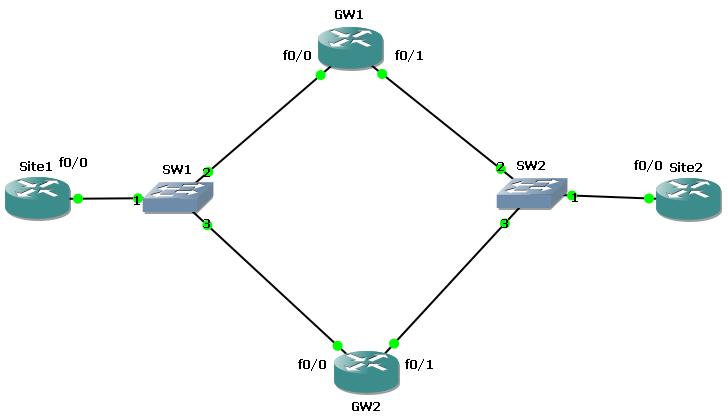
In this section we will do an HSRP Cisco Configuration to understand the issue better. To do this we will use the below HSRP topology. At the end of this article, you will find the GNS3 configuration lab of this lesson.
redundancy protocols HSRP example (Hot Standby Router Protocol) topology, protocols for redundancy
 
HSRP Example Topology
  Before the HSRP (Hot Standby Router Protocol) configuration, we must prepare our topology. We will change the router names and we will assigned the ip addresses of the router interfaces. For the left side of the topology, we will use 10.10.10.0 network and for the right side, we will use 10.10.20.0 network. All the interfaces connected to the layer 2 swicth will be assigned with the ip addresses related to its connected port. For example the fa0/0 interface of the Site1 router will be assigned the ip address 10.10.10.1 and the GW1’s and GW2’s fa0/0 ip addresses will be 10.10.10.2 and 10.10.10.3 orderly. After interface configuration, we will configure a static route on each Site1 and Site2. In this static route we will use two virtual ip addresses that we will explain in this article. This virtual addresses will be 10.10.10.10 and 10.10.20.20.
Site1(config)# ip route 10.10.20.0 255.255.255.0 10.10.10.10 
Site2(config)# ip route 10.10.10.0 255.255.255.0 10.10.20.20
Now our configuration is ready to HSRP configuration. Let’s start on one side(left) on GW1 and GW2 and after that we will configure a second HSRP Cisco Configuration for the other side(right). GW1
GW1(config)# interface fastethernet 0/0 
GW1(config-if)# standby 1 ip 10.10.10.10 
GW1(config-if)# standby 1 preempt 
GW1(config-if)# standby 1 priority 110 
GW1(config-if)# standby 1 track fa0/1  
GW1(config-if)# exit 
GW1(config)# interface fastethernet 0/1 
GW1(config-if)# standby 1 ip 10.10.20.20 
GW1(config-if)# standby 1 preempt 
GW1(config-if)# exitGW2
GW2
GW2(config)# interface fastethernet 0/0 
GW2(config-if)# standby 1 ip 10.10.10.10 
GW2(config-if)# standby 1 preempt 
GW2(config-if)# standby 1 priority 100 
GW2(config-if)# standby 1 track fa0/1  
GW2(config-if)# exit 
GW2(config)# interface fastethernet 0/1 
GW2(config-if)# standby 1 ip 10.10.20.20 
GW2(config-if)# standby 1 preempt 
GW2(config-if)# exit
You do not need to do this HSRP Cisco Configuration for both sides, but in this configuration, we do it for both sites. After this you can check the configuration with “show standby” command on GW1 and GW2. As you see below, for both redundancy configuration GW1 is the active router and the GW2 is the standby.

redundancy protocols HSRP (Hot Standby Router Protocol) show standby on active router cisco
 
Show Standby On Active Router (HSRP)
 
redundancy protocols HSRP (Hot Standby Router Protocol) show standby on standby router cisco
 
Show Standby On Standby Router (HSRP)
  [sc name=”ContentRMessage”]

Leave A Reply

Your email address will not be published. Required fields are marked *

You May Also Like

Cisco Systems is one of the important vendors in information technology and network field. Many network engineers work with Cisco...
What is NOS? A NOS (Network Operating System) is a special software that is designed for network equipment like router,...

SFP

SFP (Small Form-factor Pluggable) is a hot-pluggable network interface module used in the network devices of today’s computer networks. In...
In this EVE-NG VMware installation post, we will focus on one of the popular network emulators, EVE-NG. We will learn...