Private VLAN Cisco Configuration Example

  • September 10, 2017
private-vlans-example

Cisco Private VLAN Configuration Example

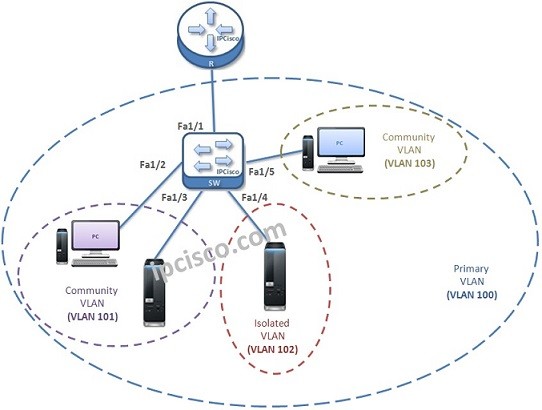
For Private VLAN configuration, we will do a configuration example with one switch and one router. Here, we will use the same topology that we have used before for Private VLAN overview. Our topology, ports and VLANs will be like below:
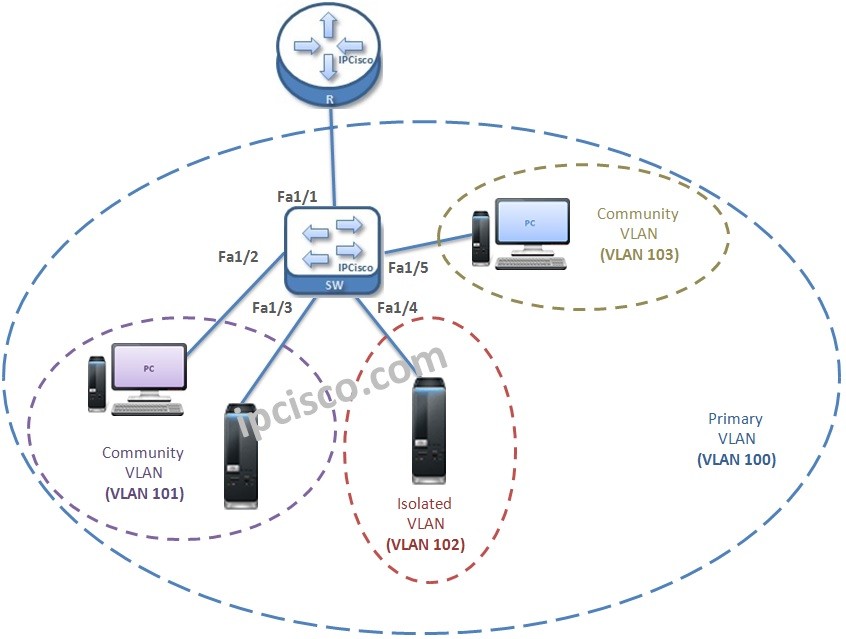
private-vlans-example We will do the below Configuration on the Switch, one by one.


For all Packet Tracer Examples and Files, you can check Packet Tracer Labs Page.

Cisco Private VLAN Configuration Steps

1. Set VTP Mode as “Transparent Mode”.

The first step is determination of the VTP Mode of the switch. It must be in “Transparent Mode”.
IPCisco# config terminal
IPCisco(config)# vtp mode transparent

2. Secondary VLANs Creation.

Secondly, we will create the Secondary VLANs.
IPCisco(config)# vlan 101 
IPCisco(config-vlan)# private-vlan community 
IPCisco(config-vlan)# end
IPCisco(config)# vlan 102 
IPCisco(config-vlan)# private-vlan community 
IPCisco(config-vlan)# end
IPCisco(config)# vlan 103
IPCisco(config-vlan)# private-vlan isolated 
IPCisco(config-vlan)# end

3. Primary VLAN Creation.

In the step three, we will create Primary VLAN.
IPCisco(config)# vlan 100 
IPCisco(config-vlan)# private-vlan primary 
IPCisco(config-vlan)# end

For all Packet Tracer Examples and Files, you can check Packet Tracer Labs Page.

4. Association Secondary VLANs to Primary VLAN.

Secondary VLANs need to be associated to the Primary VLAN.In this step, we will associate Secondary VLANs to Primary VLANs.
IPCisco(config)# vlan 100 
IPCisco(config-vlan)# private-vlan association 101-103 
IPCisco(config-vlan)# end 
After this step, we can use “show vlan private-vlan” command and we can see all the Secondary VLANs are associated with Primary VLAN.
IPCisco# show vlan private-vlan
Primary 	Secondary 	Type 		Interfaces 
------------	 --------------	-------		--------------- 
100 		101 		community 
100 		102		community 
100 		103 		isolated
[sc name=”ContentRMessage”] Private VLAN Lessons Private VLANs Private VLAN Cisco Configuration
What is Protected Port?

Other VLAN Lessons :
VLAN - Part 1 VLAN - Part 2 (VLAN Assignments and VLAN Port Types) VLAN - Part 3 (VLAN Frame Tagging Protocols, ISL and Dot1.q) VLAN - Part 4 (How to Configure Cisco VLANs) VLAN - Part 5 (Packet Tracer VLAN Configuration Example) VLAN Configuration on Huawei Switches

Leave A Reply

Your email address will not be published. Required fields are marked *

You May Also Like

Cisco Systems is one of the important vendors in information technology and network field. Many network engineers work with Cisco...
What is NOS? A NOS (Network Operating System) is a special software that is designed for network equipment like router,...

SFP

SFP (Small Form-factor Pluggable) is a hot-pluggable network interface module used in the network devices of today’s computer networks. In...
CCNP ENCOR 350-401 Exam is the required exam for CCNP ENCOR (Implementing Cisco Enterprise Network Core Technologies) or CCIE Enterprise...