How to Configure OSPFv2 on Nokia Service Routers?
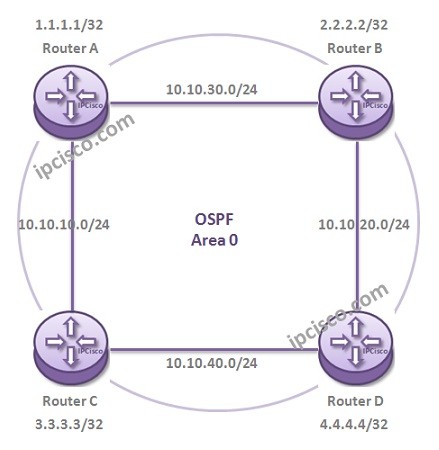
In this lesson, we will see How to Configure Single Area OSPF on Nokia (Formerly Alcatel-Lucent) Service Routers. We will learn Nokia OSPF Configuration. Here, we will use Nokia 7750 Service Routers. For our Single Area OSPF Configuration example, we will use the below topology.
You can also download all Nokia Labs, on Nokia Configuration Labs Page.
In this Nokia OSPF Configuration, we assume that all the interface IP configurations are done like above. And also the interfaces will be named like below:
Interface from A to B = AtoB
Interface from A to C = AtoC
Interface from B to A = BtoA
Interface from B to D = BtoD
Interface from C to A = CtoA
Interface from C to D = CtoD
Interface from D to C = DtoC
Interface from D to B = DtoB
For our Nokia OSPF Configuration, fistly, we will add the interface that will run OSPF under the OSPF Area 0. Here, we will use only one area, so all the OSPF interfaces will be under OSPF processs. Both the physical interfaces and the system interfaces will be added under OSPF process.
And we will also configure the OSPF interfae type for the physical OSPF interfaces.
Nokia Router A# configure router ospf
Nokia Router A#>config>router>ospf$ area 0
Nokia Router A#>config>router>ospf>area$ interface system
Nokia Router A#>config>router>ospf>area>if$ exit
Nokia Router A#>config>router>ospf>area$ interface AtoB
Nokia Router A#>config>router>ospf>area>if$ interface-type point-to-point
Nokia Router A#>config>router>ospf>area>if$ exit
Nokia Router A#>config>router>ospf>area$ interface AtoC
Nokia Router A#>config>router>ospf>area>if$ interface-type point-to-point
Nokia Router A#>config>router>ospf>area>if$ exit
We will configure all the routers similarly.
Nokia Router B# configure router ospf
Nokia Router B#>config>router>ospf$ area 0
Nokia Router B#>config>router>ospf>area$ interface system
Nokia Router B#>config>router>ospf>area>if$ exit
Nokia Router B#>config>router>ospf>area$ interface BtoA
Nokia Router B#>config>router>ospf>area>if$ interface-type point-to-point
Nokia Router B#>config>router>ospf>area>if$ exit
Nokia Router B#>config>router>ospf>area$ interface BtoD
Nokia Router B#>config>router>ospf>area>if$ interface-type point-to-point
Nokia Router B#>config>router>ospf>area>if$ exit
Nokia Router C# configure router ospf
Nokia Router C#>config>router>ospf$ area 0
Nokia Router C#>config>router>ospf>area$ interface system
Nokia Router C#>config>router>ospf>area>if$ exit
Nokia Router C#>config>router>ospf>area$ interface CtoA
Nokia Router C#>config>router>ospf>area>if$ interface-type point-to-point
Nokia Router C#>config>router>ospf>area>if$ exit
Nokia Router C#>config>router>ospf>area$ interface CtoD
Nokia Router C#>config>router>ospf>area>if$ interface-type point-to-point
Nokia Router C#>config>router>ospf>area>if$ exit
[sc name=”ContentRMessage”]