What is Netflow?
In this lesson, we will learn
What is NetFlow and we will see
Netflow Cisco Configuration. Neflow is a network that is used to
monitor the network and to
collect ip traffic information. By
analyzing your network traffic, Netflow gives you a
picture of the network. It has developed by Cisco.
Netflow gives the answers of the questions related with network IP traffic. These questions are:
By answering these questions,
Netflow provides a detailed network behavior view. With the help of Netflow, you can determine how your network resources are being used.
Before
Netflow, network engineers were using
SNMP (Simple Network Management Protocol) for network monitoring and network analyze.
SNMP is good at Network monitoring but not good at in network analyze. So, Netflow is started to used.
What is Traffic Flow?
Traffic Flow is basically a sequence of
packets from a source to a destination in networking. In other words, if two nodes are communicating, a flow refers to any connection or connection-like communication channel.
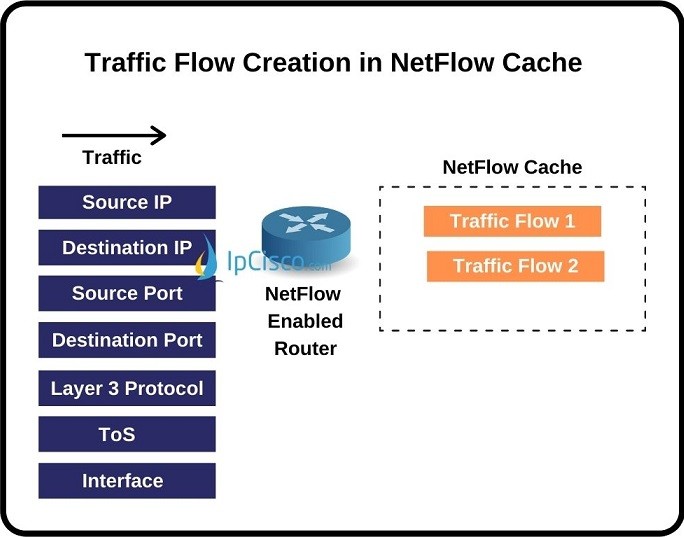
So how can we define a traffic flow? Which attributes are used to define traffic flow? The seven attributes that are inspected and used to create traffic flow are given below:
- Source IP address
- Destination IP address
- Source Port
- Destination Port
- Layer 3 Protocol
- TOS
- Router or Switch Interface
Netflow Components
There are
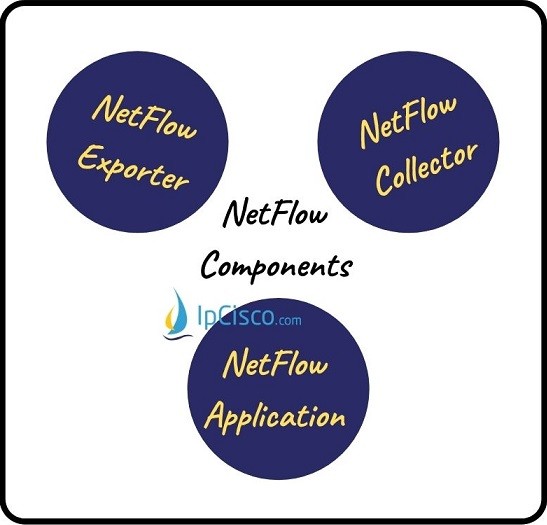
three Netflow Components used for different purposes. These
Netflow Components are given below:
- Flow Exporter
- Flow Collector
- Flow Application
 Flow Exporter
 is an appliance or a Netflow enabled device that generates traffic flow records. Flow Exporter also exports these records to the Flow Collector periodically.
Flow Collector is an appliance or a program on a server that collects the traffic flow that is sent by Flow Exporter, stores these flows and prepares them for processing.
Flow Application is the application that analyze the traffic flow and produce results, reports, alerts etc.
How Does Netflow Work?
We have talked about
what is Netflow and we have seen the
Netflow components. Now, it is time to learn
how does Netflow Work?
As we have discussed above, there are three common components of
Netflow.
Firstly, the
Flow Exporter sends the flow information to the
Flow Collector. This process is done periodically, in other words
Flow Exporter sends traffic to the
Flow Collector in certain periods. By the way the transmission protocol used for this data transfer is
UDP (User Datagram Protocol).
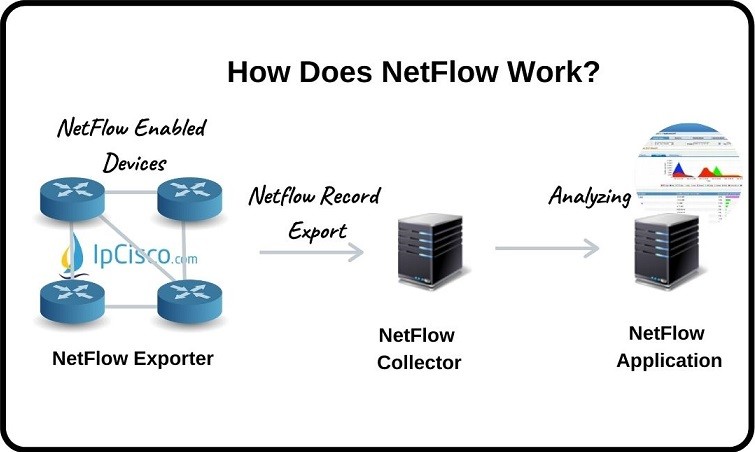
When the traffic flow comes to
Flow Collector, Flow Collector gets this flow and stores this flow in its databases. Flow Collector also prepares this flow for the Flow Analyzer and sends the flow to it.
At the
Flow Analyzer, the traffic flow is analyzed by the
Flow Analyzer. As a result, different reports and alerts are created that shows the behavior of the network traffic flow.
Netflow Versions
Netflow has developed by
Cisco in
1996. After that, this protocol has developed times and times as backward compatible with the other versions.
Different versions has different Netflow record fields. This depends on the Netflow version supported by
Netflow Exporter.
So, what are the versions of Netflow? Let’s explain each version one by one.
Version 1: The first version that is restricted to IPv4.
Version 2,3,4: The versions used by Cisco internally and never released.
Version 5: The version that is commonly deployed and standard. It has been used by many other vendors. Restricted to IPv4.
Version 6: The version that is no longer supported by Cisco.
Version 7: The version similar to version 5 but it does not include AS, interface, TCP Flag & TOS information.
Version 8: The version uses several aggregation forms and reduces resource usage.
Version 9: The Netflow version that is template based and supported by recent routers. Used for IPv4, IPv6, MPLS, BGP Next Hop traffic flows.
Netflow Version 9 has some advantages for Security, Traffic Analyzes and Multicast. It is also flexible and has extendible file export format. It is easy to support additional fields for this version.
Netflow Benefits
There are many
benefits of using
Netflow both for Service Provider and Users. These
Netflow benefits are given below:
- Gives Deep Network Visibility: You can see the details of your network with Netflow.
- User Monitoring: By tracking user, user behaviors like which traffic type they use, how long they were in the network, which part did they use etc.
- Security Monitoring: Netflow analyze the flow information and identify the attacks. It helps to mitigate network attacks.
- Used For Accounting and Billing: Netflow information can be used for user accounting and billing process.
- Used in Traffic Engineering: Service Providers can use Netflow for Traffic Engineering Calculations.
- Used For Network and Capacity Planning: Service Providers can determine network enlargement and capacity upgrades with Netflow information.
- Reduces Costs: By giving you an audit report, Netflow reduces your operational costs.
- Reduces Troubleshooting Times: By using different reports, Netflow reduces troubleshooting times in networking.
Netflow Cisco Configuration Example
We have learned
what is Netflow and
Why we use it in the previous lesson. Now, it is time to learn
How to Configure Netflow on Cisco Devices? Here, we will see
Netflow Cisco Configuration in four steps. These
Configuration steps are given below:
- Enabling Netflow Export
- Enabling Netflow on Monitored Interfaces
- Optional Netflow Configurations
- Netflow Configuration Verification
Now, let’s see the
Netflow commands used in these steps one by one.
Enabling Netflow Export
In
Netflow Cisco Configuration, the first step is enabling
Netflow Export on the Flow Exporter appliance or device. To enable
Netflow Export on the device, we will use the below commands:
To set flow destination IP address, we will use the below command. Here, we will set Netflow Collector’s IP Address as destination IP address.
- Router (config) # ip flow-export destination <Netflow Collector’s IP Address>
To set flow source IP address, we will use the below command. Here, we will set Loopback Interface IP Address as source IP address.
- Router (config) # ip flow-export source <Loopback Interface IP Address>
To set Netflow version, we will use the below command. Here, we will set the version as Netflow version 9. You can use 5 or 7 instead.
- Router (config) # ip flow-export version 9
We will set the timout values for active and inactive with the below commands.
- Router (config) # ip flow-cache timeout active 1
- Router (config) # ip flow-cache timeout inactive 15
We will also use the below command to enable SNMP ifIndex persistence globally.
- Router (config) # snmp-server ifindex persist
Enabling Netflow on Monitored Interfaces
We need to enable the interfaces that we would like to monitor with the “
ip flow ingress” command under each layer 3 interfaces.
- Router (config) # interface <interface>
Router (config-if) #
ip flow ingress
Optional Netflow Configurations
As an optional configuration steps, we can also use the below commands for including BGP Origin AS, MAC Addresses and VLANs.
Router (config) #
ip flow-export version 9 origin-as
Router (config) #
ip flow-capture mac-addresses
Router (config) #
ip flow-capture vlan-id
Netflow Configuration Verification
There are various show commands used to verify
Netflow Configuration. The most commons are given below:
- show ip cache flow
- show ip flow export
- show ip flow interface
- show ip flow export template
In this lesson, we have learned the basic steps of
Netflow Cisco Configuration on
Cisco IOS. There are different configuration steps for other Cisco Operating Systems. You can learn how to configure Netconf on different Cisco devices from the related document on Cisco Website. You can view this article
here.
[sc name=”ContentRMessage”]