In this configuration example, we will focus on how to configure MVRP on Cisco switches. Here, we will use Cisco Catalyst 6500 series switches. For our MVRP configuration example, we will use the below topology.
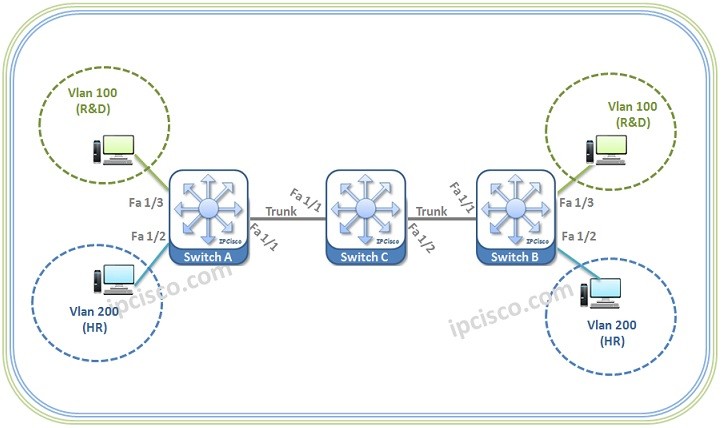
Let’s start our MVRP configuration.
Switch A Configuration
We will start with Switch A configuration.
First of all we will
enable MVRP globally with “
mvrp global” command under the global context. After that we will
enable GVRP under the interfaces with “
mvrp” command.
SwitchA> enable
SwitchA# configure terminal
SwitchA(config)# mvrp global
SwitchA(config)# interface FastEthernet 1/1
SwitchA(config-if)# mvrp
We will set the registration mode of our interfaces.
SwitchA(config)# interface FastEthernet 1/1
SwitchA(config-if)# mvrp registration normal
SwitchA(config-if)# exit
Automatic MAC learning is not enabled by default. To enable Automatic MAC learning, we will use “mvrp mac-learning auto” command.
SwitchA(config)# mvrp mac-learning auto
To dynamically create VLANs, we will configure our router as “transparent”. This is a requirement for dynamic VLAN creation. After setting our router as tranparent, we will use “mvrp vlan create” command and we will enable dynamic VLAN creation.
SwitchA(config)# vtp mode transparent
SwitchA(config)# mvrp vlan create
Now, we will create VLANs and we will assign the ports to these VLANs.
[sc name=”ContentRMessage”]
Other GVRP, MVRP and VTP Articles...
GVRP Overview
GVRP Configuration on Cisco
GVRP Configuration on Huawei
MVRP Overview
MVRP Configuration on Cisco
MVRP Configuration on Juniper