MLD Configuration on Cisco
In this lesson we will configure Multicast Listener Discovery (MLD) on Cisco devices. Out Multicast Network will be like below:
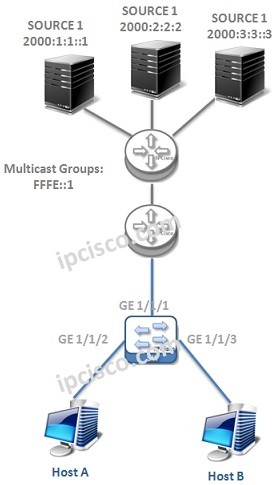
Now, let’s start to configure MLD.
MLD Version
The default version of MLD is version 2. But to show you, we will configure this version even it not required. To do this we will use “ipv6 mld version 2” command.
switch# config t
switch(config)# interface ethernet 1/1
switch(config-if)# ipv6 mld version 2
Nore: Here, we are showing only one interface, but this configuration must be done on each MLD interface. This is true for all the interface configurations.
Static Group Binding
To bind a group to an interface statically, we will use the below command under the interface:
switch(config-if)# ipv6 mld join-group FFFE::1
MLD Timers
There are various timers used with MLD like IGMP. Here, we will show the most important and widely modified ones.
• MLD Startup Query Interval
• Querier Timeout
• Query Timeout
• Query Max Response Time
• Query Interval
• Last Member Query Response Time
• Group Timeout
MLD timers are configured under the interface that MLD run.
switch(config-if)# ipv6 mld startup-query-interval 25
switch(config-if)# ipv6 mld querier-timeout 250
switch(config-if)# ipv6 mld query-timeout 200
switch(config-if)# ipv6 mld query-max-response-time 10
switch(config-if)# ipv6 mld query-interval 150
switch(config-if)# ipv6 mld last-member-query-response-time 3
switch(config-if)# ipv6 mld group-timeout 200
The default values of some of the MLD values are given below:
[sc name=”ContentRMessage”]
Other MLD Articles
Multicast Listener Discovery (MLD) – Overview
Multicast Listener Discovery (MLD) – MLD Operations
Multicast Listener Discovery (MLD) – MLD Configuration on Cisco