How to Configure ISIS For IPv6 on Cisco?
In this
Cisco ISIS for IPv6 configuration example, we will configure
ISIS with IPv6 extension configuration commands.
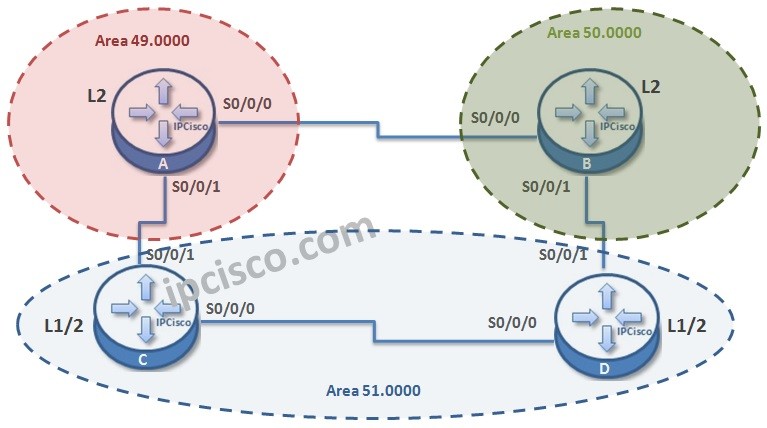
For our example we will use the below four-routered topology. Here, we will have 3 different area. There is a Single Topology and Multi-Topology configurations with ISIS for IPv6. We will give an example to Multi-Topology here.
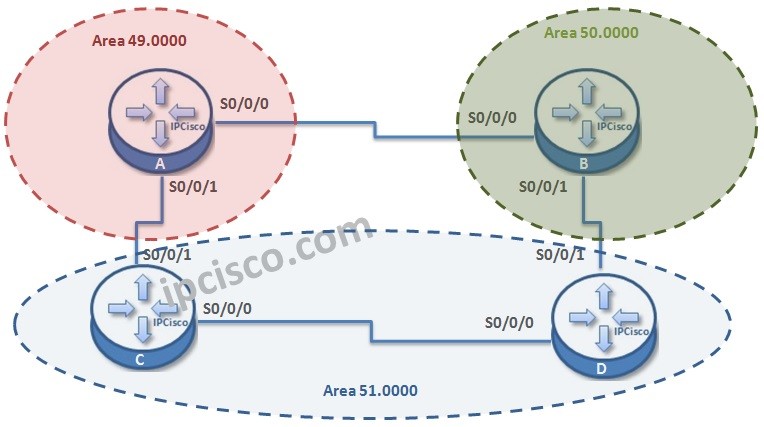
Let’s start the
ISIS for IPv6 configuration.
Firstly, we will enable
IPv6 routing on each routers. We will do this with “
ipv6 unicast-routing” command.
Router A # config terminal
Router A (config) # ipv6 unicast-routing
Router B # config terminal
Router B (config) # ipv6 unicast-routing
Router C # config terminal
Router C (config) # ipv6 unicast-routing
Router D # config terminal
Router D (config) # ipv6 unicast-routing
Now,
IPv6 Routing is enabled on each router. It is time to configure router ISIS process. Here, we will use a name for ISIS process. This name is “
ABC”. Beside, we will give
NET Addresses to the interface and we will configure the router global level.
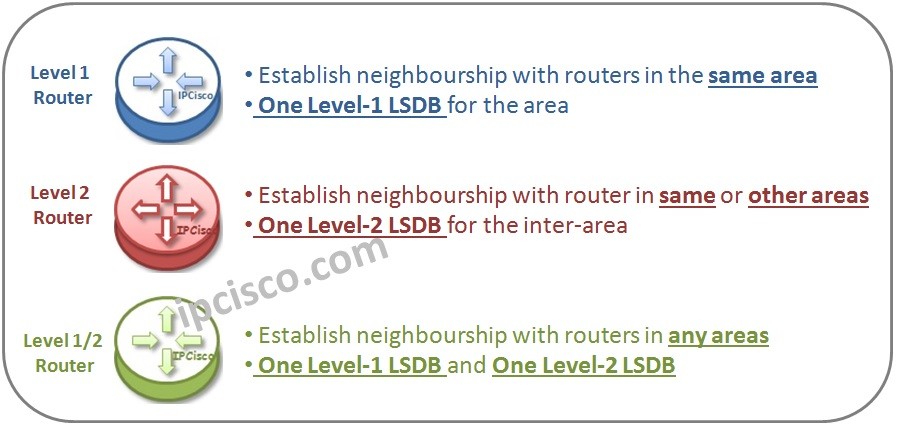
By the way, let’s remember the router levels with a shape.
Router A (config) # router isis ABC
Router A (config-rtr)# net 49.0000.0000.0000.AAAA.00
Router A (config-rtr)# is-type level-2-only
Router B (config) # router isis ABC
Router B (config-rtr)# net 50.0000.0000.0000.BBBB.00
Router B (config-rtr)# is-type level-2-only
[sc name=”ContentRMessage”]