In all network device, there is a File System. In Huawei routers and switches there is also a File System. File System stores many important files for the system like sytem files, configuration files, software upgrades etc.
File System Commands
Almost everyone has used window command line (cmd). There are some commands used with File System in Huawei devices and these System commands are very similar to windows command line commands.
Let’s give some examples to this File System commands:
pwd : shows current directory
dir : shows content of the directory
cd : used to change current directory
mkdir : used to create directory
rmdir : used to delete directory
more : used to view content of the file
copy : used to copy file
move : used to move file
delete : used to delete file
undelete : used to recover file
rename : used to give a new name to the file
Now, let’s talk about the some specific system files.
Configuration Files
Configuration Files are the files that includes all the configurations about the device. There are two type Configuration File in Huawei devices. These Configuration Files are:
• Current-Configuration File
• Saved-Configuration File
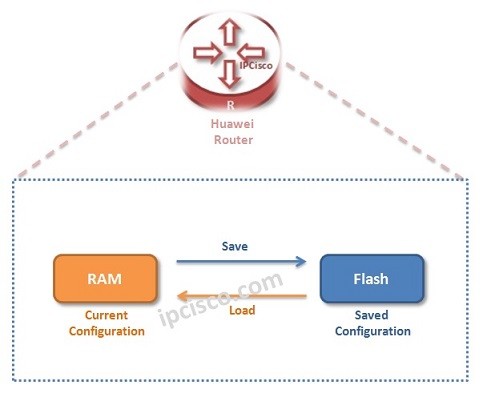
Current-Configuration is the configuration lastly on the device. Current-Configuration File is not in Flash yet. It is stored in RAM.
Saved-Configuration is the configuration lastly saved on the device. Saved-Configuration File is stored in Flash and it is loaded from here at the system startup.
To view these two Configuration Files, we will use display commands.
display current-configuration
display saved-configuration
[sc name=”ContentRMessage”]