In this configuration example, we will focus on how to configure
GVRP on Cisco. Here, for our
GVRP Configuration Example, we will use the below topology.
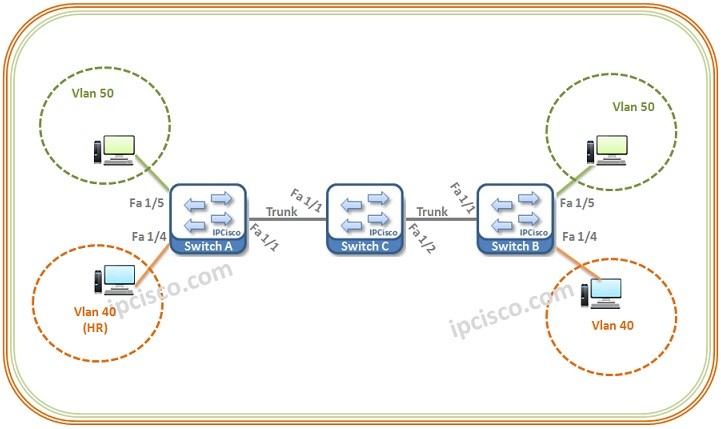
Let’s start our
GVRP Configuration on each of these Switches.
Switch A Confguration
Firstly, we will create our
VLANs (40 and 50) then we will enable
GVRP globally on the switch.
Cisco-Switch-A> enable
Cisco-Switch-A# configure terminal
Cisco-Switch-A(config)# vlan 40
Cisco-Switch-A(config)# vlan 50
Cisco-Switch-A(config)# gvrp enable
Then we will configure the interfaces and we will also enable
GVRP on these interfaces.We will configure the vlan ports as Access and the trasport port (the link between the switches) as Trunk.We will allow only the required VLAN on Access ports, but we will allow all VLANs on Trunk port.
Cisco-Switch-A(config)# interface fastethernet 1/4
Cisco-Switch-A(config-if)# switchport mode access
Cisco-Switch-A(config-if)# switchport access vlan 40
Cisco-Switch-A(config-if)# gvrp enable
Cisco-Switch-A(config-if)# interface fastethernet 1/5
Cisco-Switch-A(config-if)# switchport mode access
Cisco-Switch-A(config-if)# switchport access vlan 50
Cisco-Switch-A(config-if)# gvrp enable
Cisco-Switch-A(config-if)# interface fastethernet 1/1
Cisco-Switch-A(config-if)# switchport mode trunk
Cisco-Switch-A(config-if)# switchport access vlan all
Cisco-Switch-A(config-if)# gvrp enable
Cisco-Switch-A(config-if)# end
Lastly, we will save our configuration.
Cisco-Switch-A# copy running-config startup-config
Switch B Configuration
We will configure Switch B similar to switch A.
Cisco-Switch-B> enable
Cisco-Switch-B# configure terminal
Cisco-Switch-B(config)# vlan 40
Cisco-Switch-B(config)# vlan 50
Cisco-Switch-B(config)# gvrp enable
[sc name=”ContentRMessage”]
Other GVRP, MVRP and VTP Articles…/u>
GVRP Overview
GVRP Configuration on Cisco
GVRP Configuration on Huawei
MVRP Overview
MVRP Configuration on Cisco
MVRP Configuration on Juniper