In this article, we will focus on File Transfer Protocol (FTP), FTP Ports and FTP Modes. We will firstly learn what is FTP. And then, we will learn ports of FTP. After that we will see FTP active and passive modes. We will learn FTP ports used in the different FTP modes with examples.
 With FTP we can do data transfer over FTP ports. For example, we can download a file to an FTP Client from a remote FTP Server. Or we can upload a file from FTP Client to FTP Server. As a summary, FTP is the general name of file transfer in network World.
FTP uses two channels for file transfer. One of these channels is FTP control or FTP command channel. The other is FTP data channel. Different FTP ports are used for these channels.
The file transer with File Transfer Protocol is done over FTP ports. So, what are these ports of FTP?
With FTP we can do data transfer over FTP ports. For example, we can download a file to an FTP Client from a remote FTP Server. Or we can upload a file from FTP Client to FTP Server. As a summary, FTP is the general name of file transfer in network World.
FTP uses two channels for file transfer. One of these channels is FTP control or FTP command channel. The other is FTP data channel. Different FTP ports are used for these channels.
The file transer with File Transfer Protocol is done over FTP ports. So, what are these ports of FTP?
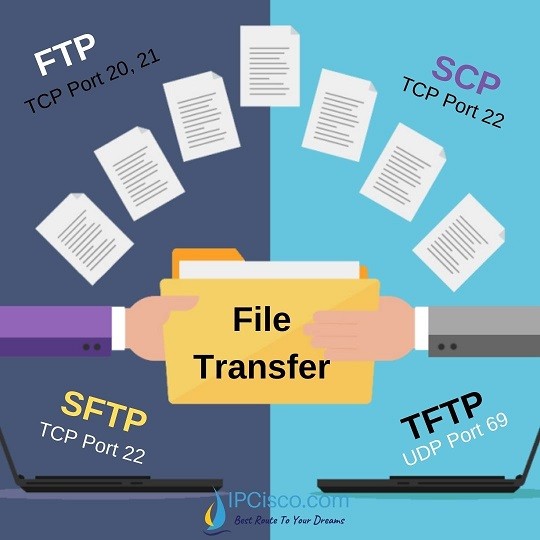
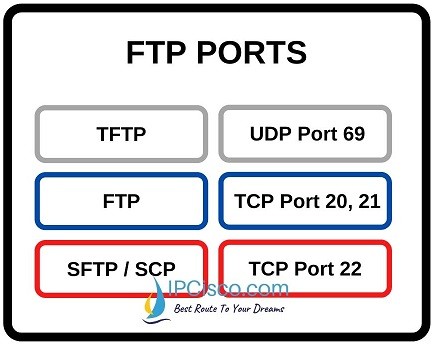 Beside FTP, there are also simpler protocol TFTP (Trivial File Transport Protocol) and more secure protocols, SFTP (SSH File Transfer Protocol), SCP (Secure Copy Protocol) and FTPS (FTP over SSL). TFTP uses UDP port 69, SFTP uses TCP port 22 and FTPS uses TCP port 990. And SCP also uses TCP port 22. So, as a summary, ports of FTP are given below:
 At this point, FTP Server initiates another TCP three-way handshake to the FTP Client from server TCP port 20 to the ftp client port 1025. After that, the file transfer starts.
As a summary, here, there are two different TCP three-way handshake connection. The first one is from FTP Client to FTP Server. From client port n to server port 21. The second one is from FTP Server to FTP client. From server port 20 to client port n+1.
At this point, FTP Server initiates another TCP three-way handshake to the FTP Client from server TCP port 20 to the ftp client port 1025. After that, the file transfer starts.
As a summary, here, there are two different TCP three-way handshake connection. The first one is from FTP Client to FTP Server. From client port n to server port 21. The second one is from FTP Server to FTP client. From server port 20 to client port n+1.
 The client connects its command port to ftp port 21 of the ftp server. And it says to the server that it uses passive mode with PASV command. When server receives this message, it opens as registered port again, this can be port 1030 and then it informs the client. After that the client initiates TCP three-way handshake. In other words, the data transfer is started from clients ’s data port, port 1025, to the server data port, port 1030.
In this post, we have talked about FTP (File Transfer Protocol), FTP ports and FTP modes. We have learned ports of FTP with different FTP connections examples.
The client connects its command port to ftp port 21 of the ftp server. And it says to the server that it uses passive mode with PASV command. When server receives this message, it opens as registered port again, this can be port 1030 and then it informs the client. After that the client initiates TCP three-way handshake. In other words, the data transfer is started from clients ’s data port, port 1025, to the server data port, port 1030.
In this post, we have talked about FTP (File Transfer Protocol), FTP ports and FTP modes. We have learned ports of FTP with different FTP connections examples.
File Transfer Protocol
What is FTP?
File Transfer Protocol (FTP) is a network protocol used in application layer of OSI Model or TCP/IP Model. With File Transfer Protocol (FTP), we can transfer files between two nodes that works as client and server. In other words, FTP is a file transfer protocol. And with such a working model, FTP is a Client/Server protocol. FTP is not a secure file transfer protocol. Because, it uses clear-text password and username for file transfers. Instead of FTP, SFTP (SSH File Transfer Protocol) is used as a secure alternative. With SFTP, encrypted passwords and usernames are used.
With FTP we can do data transfer over FTP ports. For example, we can download a file to an FTP Client from a remote FTP Server. Or we can upload a file from FTP Client to FTP Server. As a summary, FTP is the general name of file transfer in network World.
FTP uses two channels for file transfer. One of these channels is FTP control or FTP command channel. The other is FTP data channel. Different FTP ports are used for these channels.
The file transer with File Transfer Protocol is done over FTP ports. So, what are these ports of FTP?
What is an FTP Port?
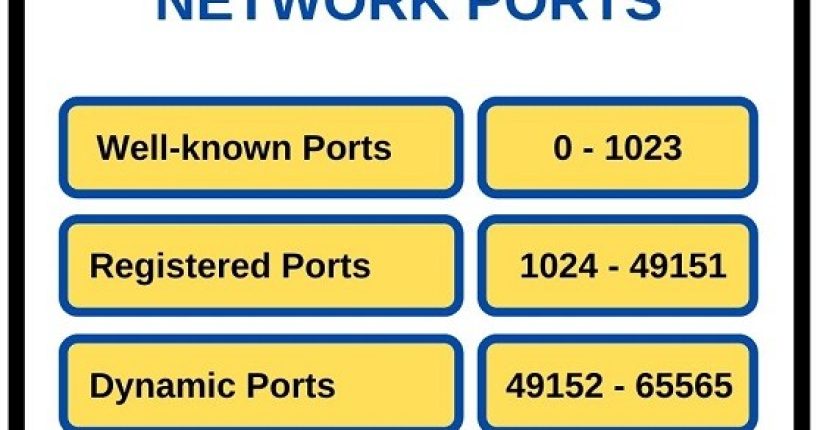
As you know, there are various port types in network World. These ports are given below:- Well-known Ports
- Registered Ports
- Dynamic Ports
Beside FTP, there are also simpler protocol TFTP (Trivial File Transport Protocol) and more secure protocols, SFTP (SSH File Transfer Protocol), SCP (Secure Copy Protocol) and FTPS (FTP over SSL). TFTP uses UDP port 69, SFTP uses TCP port 22 and FTPS uses TCP port 990. And SCP also uses TCP port 22. So, as a summary, ports of FTP are given below:
- FTP TCP Port 20,21
- TFTP UDP Port 69
- SFTP TCP Port 22
- SCP TCP Port 22
- FTPS TCP Port 990
FTP Active and Passive Mode Connections
We have learned what is FTP. And we have seen FTP ports for different File Transfer Protocols. Now, it is time to learn different connection modes of FTP. There are two modes for FTP connections. These FTP modes are:- Active mode
- Passive mode
FTP Active Mode
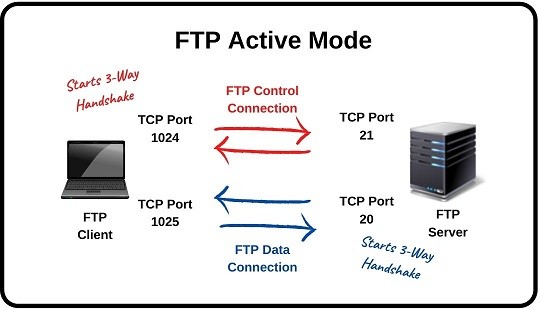
In Active mode FTP, firstly you need to check the FTP software. FTP active mode must be enabled on this software. Generally, active mode is enabled on the ftp softwares by default. So how ftp active modes work? In Active mode, the client opens a random registered port. This can be any port from 1024 to 49151. For example, let’s say it select port 1024. FTP client starts a TCP three-way handshake connection and connects this port to FTP Server TCP port 21. After that FTP client opens a data port which is one port above the previous one, here port 1025. And starts to listen the data channel. In other words, it waits FTP Server to initiate data channel.
At this point, FTP Server initiates another TCP three-way handshake to the FTP Client from server TCP port 20 to the ftp client port 1025. After that, the file transfer starts.
As a summary, here, there are two different TCP three-way handshake connection. The first one is from FTP Client to FTP Server. From client port n to server port 21. The second one is from FTP Server to FTP client. From server port 20 to client port n+1.
FTP Passive Mode
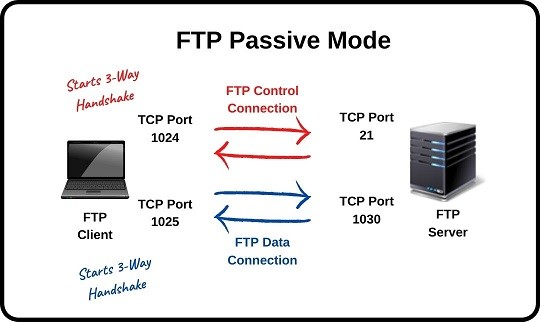
FTP passive mode is the other mode of FTP connections. This mode is used to avoid Server initiated TCP three-way handshake. Because, in Active mode, this initiation can cause some failure on firewalls. In other words, firewall of the client can think that, this is an intrusion. In Passive mode FTP, firstly, FTP passive mode must be enabled on the client. Because, generally it is not enabled by default. In this mode, ftp client opens two registered ports as ftp ports. These ports of ftp must be above 1023. For example, port 1024 and 1025. Here, the first one is used as control port and the second one is used as data port.
The client connects its command port to ftp port 21 of the ftp server. And it says to the server that it uses passive mode with PASV command. When server receives this message, it opens as registered port again, this can be port 1030 and then it informs the client. After that the client initiates TCP three-way handshake. In other words, the data transfer is started from clients ’s data port, port 1025, to the server data port, port 1030.
In this post, we have talked about FTP (File Transfer Protocol), FTP ports and FTP modes. We have learned ports of FTP with different FTP connections examples.
FTP Commands
In FTP operation, there are some main commands. We use these FTP commands and do FTP related jobs. So, what are these FTP commands? Below, you can find some of the commands of FTP: ABOR: Aborts the previous FTP command. ACCT: Gives account information. ADAT: Authentication/Security Data. ALLO: Allocates disk space to receive a file. APPE: Appends AUTH: Authentication AVBL: Gets the available space. CCC: Clear Command Channel CDUP: Change to Parent Directory CONF: Confidentiality Protection CSID: Client/Server Identification CWD: Change working directory DELE: Deletes a file DSIZ: Gets the directory size ENC: Privacy Protected Channel EPRT: Specifies an extended address and port to which the server connect EPSV: Enters extended passive mode FEAT: Gets the feature list implemented by FTP server HELP: Gets supported commands HOST: Identifies virtual host on server by name LANG: Language LIST: Lists subdirectories or files LPRT: Song address and port to which the server should connect LPSV: Long passive mode MDTM: Gets the last modified time of a file MFCT: Modifies the creation time of a file MFF: Modifies the last modification time, creation time, UNIX group/owner/mode of a file MFMT: Modifies the last modification time of a file MIC: Integrity Protected Command MKD: Makes directory MLSD: Allows an optional parameter, specifying the directory for listings are requested MLST: Returns data about exactly the object specified as parameter MODE: Transmission mode. NLST: Gets a list of file names in a directory. NOOP: Used as keepalives. OPTS: Selects options for a feature. PASS: Password for authentication. PASV: Enters passive mode. PORT: Specifies an address and port to which the server should connect. PROT: Data Channel Protection Level. PWD: Gets current directory. QUIT: Disconnects. REIN: Re-initializes the connection. REST: Restarts of data transfer. RETR: Retrieves files. RMD: Removes a directory. RMDA: Removes a directory tree. RNFR: Renames from. RNTO: Renames to. SITE: Sends site specific commands to remote server. SIZE: Returns the size of a file. SMNT: Mounts file structure. SPSV: Use single port passive mode. STAT: Returns information on the server status, including the status of the current connection. STOR: Accept the data and to store the data as a file at the server site. STOU: Stores file uniquely. STRU: Sets file transfer structure. SYST: Returns system type. THMB: Gets a thumbnail of image file. TYPE: Sets the transfer mode. USER: Username for authentication. XCUP: Changes to the parent of the current working directory. XMKD: Makes a directory. XPWD: Prints the current working directory. XRCP: Recipient specification. XRMD: Removes the directory. XRSQ: Scheme Selection. XSEM: Send, mail if cannot. XSEN: Sends to terminal. [sc name=”ContentRMessage”]