EIGRP for IPv6 is one of the most used routing protocol with IPv6. In this example, we will see how to configure EIGRP for IPv6 on Cisco routers.
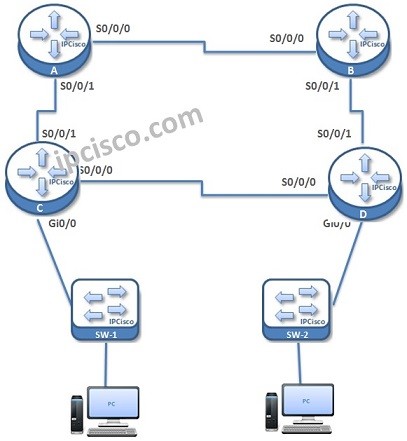
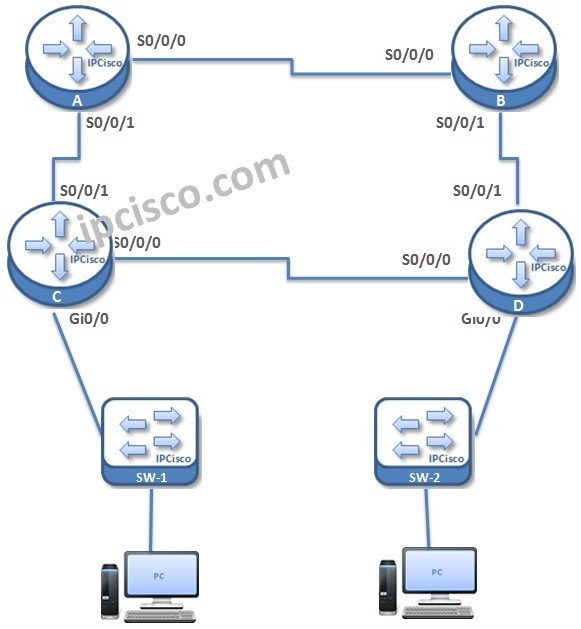
For our example, we will use the topology below.
Here, simply we have four routers connected serially eachother and two switches and PCs are connected to this routers.
 As a summary, let’s check waht will we do for EIGRP for IPv6 configuration:
1. Global IPv6 Enable on Routers
2. EIGRP for IPv6 Process Creation
3. Router-ID Assign
4. EIGRP Process addition under Interfaces
5. Passive interface configuraiton
6. Verification
Let’s see each of this EIGRP for IPv6 configuration example one by one.
First of all we enable IPv6 routing on all routers. Because, by default ipv6 routing is not enabled.
As a summary, let’s check waht will we do for EIGRP for IPv6 configuration:
1. Global IPv6 Enable on Routers
2. EIGRP for IPv6 Process Creation
3. Router-ID Assign
4. EIGRP Process addition under Interfaces
5. Passive interface configuraiton
6. Verification
Let’s see each of this EIGRP for IPv6 configuration example one by one.
First of all we enable IPv6 routing on all routers. Because, by default ipv6 routing is not enabled.
After enabling IPv6 routing, it is time to configure EIGRP for IPv6. For this configuration we will use “ipv6 router eigrp -process number-” configuration command. We will create the EIGRP process on the Router. And we will no shutdown this eigrp process.
Under IPv6 eigrp process, we will also configure a router ID. This router ID will be in IPv4 format like the one used in EIGRP before. Here our routing Ids will be 1.1.1.1, 2.2.2.2, 3.3.3.3 and 4.4.4.4 simply.
[sc name=”ContentRMessage”]
EIGRP Article Series…
EIGRP – Part 1
EIGRP – Part 2 (EIGRP Tables)
EIGRP – Part 3 (EIGRP Packet Types and Neighborship)
EIGRP – Part 4 (Other EIGRP Properties)
EIGRP – EIGRP Configuration with Packet Tracer
EIGRP for IPv6 – EIGRP for IPv6 Overview
EIGRP for IPv6 – EIGRP for IPv6 Configuration on Cisco IOS
As a summary, let’s check waht will we do for EIGRP for IPv6 configuration:
1. Global IPv6 Enable on Routers
2. EIGRP for IPv6 Process Creation
3. Router-ID Assign
4. EIGRP Process addition under Interfaces
5. Passive interface configuraiton
6. Verification
Let’s see each of this EIGRP for IPv6 configuration example one by one.
First of all we enable IPv6 routing on all routers. Because, by default ipv6 routing is not enabled.
IPv6 Routing Protocols…
IPv6 Routing Protocols – Part 1 IPv6 Routing Protocols – Part 2 (OSPFv3) IPv6 Routing Protocols – Part 3 (EIGRP for IPv6) IPv6 Routing Protocols – Part 4 (RIPng) IPv6 Routing Protocols – Part 5 (ISIS for IPv6)
IPv6 Routing Protocols CONFIGURATIONs..!
Static/Default Route Configuration Example On Cisco IOS
OSPFv3 Configuration Example On Cisco IOS
EIGRP for IPv6 Configuration Example On Cisco IOS
RIPng Configuration Example On Cisco IOS
ISIS for IPv6 Configuration Example On Cisco IOS
You can find the other IPv6 articles below…
IPv6
IPv6 – Part 1 (IPv6 and IPv6 Addresses)
IPv6 – Part 2 (What does IPv6 bring?)
IPv6 – Part 3 (Address Types in IPv6)
IPv6 – Part 4 (Subnetting IPv6)
IPv6 Static Route Configuration Examples…
IPv6 Static Route Configuration on Cisco
IPv6 Static Route Configuration on Juniper
IPv4 and IPv6 Headers…
IPv4 and IPv6 Headers