Distributed Epipe Configuration
In the previous
Epipe Example, we have talked about “
Local Epipe Configuration“. So, we have used only one device and our Epipe service was in this device. Here, we will use two router and we will show the “
VPWS Distributed Epipe Configuration“. This configuration is widely used
VPWS Epipe Service.
For this
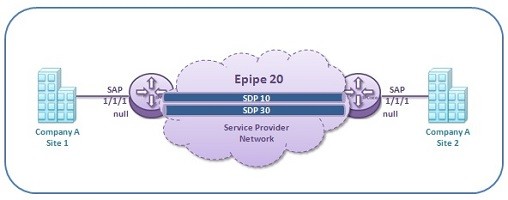
VPWS Distributed Epipe Configration, we will use the below topology. As you can see, here, we will use two routers and one more term,
SDP (Service Distribution Point).
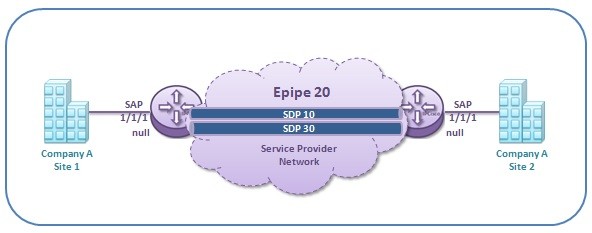
Here, the first configuration steps of
VPWS Distributed Epipe is the same as before. We will create service and link it to a customer. We will un shutdown the service. We will add SAPs at the two end. Here, we will add one more thing,
SDP configuration.
Firstly, let’s create
Epipe Service and link it to a Customer.
Nokia-Router-1 #
config
Nokia-Router-1>config#
service
Nokia-Router-1>config>service#
epipe 20
Nokia-Router-1>config>service>epipe#
customer 3 create
Nokia-Router-1>config>service>epipe#
description “Epipe-to-Router-2”
Nokia-Router-1>config>service>epipe#
no shutdown
Now, let’s create
SAP under the Epipe Service.
Nokia-Router-1>config>service>epipe#
sap 1/1/1 create
Nokia-Router-1>config>service>epipe>sap #
no shutdown
Nokia-Router-1>config>service>epipe>sap #
exit
Now, the different part is came. We will configure
SDP.
SDP is showed like below:
SDP-ID : VC-ID
Here, SDP-ID is local to the router. It can be any value. But,
VC-ID must be same on both routers.
Nokia-Router-1>config>service #
epipe 20 customer 3
Nokia-Router-1>config>service>epipe#
spoke-sdp 10:100
Nokia-Router-1>config>service>epipe>spoke-sdp#
no shutdown
Nokia-Router-1>config>service>epipe>spoke-sdp#
exit
Nokia-Router-1>config>service>epipe#
no shutdown
Now, let’s configure Epipe Service on the second router.
Nokia-Router-2 #
config
Nokia-Router-2>config#
service
Nokia-Router-2>config>service#
epipe 20
Nokia-Router-2>config>service>epipe#
customer 3 create
Nokia-Router-2>config>service>epipe#
description “epipe to Router-1”
Nokia-Router-2>config>service>epipe#
no shutdown
Nokia-Router-2 > config > service > epipe#
sap 1/1/1 create
Nokia-Router-2 > config > service > epipe> sap #
no shutdown
Nokia-Router-2 > config > service > epipe> sap #
exit
Nokia-Router-2 > config > service #
epipe 20 customer 3
Nokia-Router-2 > config > service > epipe#
spoke-sdp 30:100
Nokia-Router-2 > config > service > epipe>spoke-sdp#
no shutdown
Nokia-Router-2 > config > service > epipe>spoke-sdp#
exit
Nokia-Router-2 > config > service > epipe#
no shutdown
Distributed Epipe Verification
To verify
VPWS services, we can use many commands on
Nokia 7750 SR Routers. These commands are given below:
- Show service customer
- Show service id [base | all | labels | sdp [detail]]
- Show service service-using
- Show service sap-using
- Show service sdp-using
- Show service sdp [detail]
- Show router ldp bindings
Nokia-Router-1 #
show service customer
===========================================================
Customers
===========================================================
Customer-ID : 3
Contact : Technical Support Team
Description : Customer IPCisco
Phone : 123-123-123
———————————————————–
Total Customers : 1
———————————————————–
Nokia-Router-1 #
show service id 100 base
======================================================================
Service Basic Information
======================================================================
Service Id : 100 Vpn Id : 0
Service Type : epipe
Customer Id : 3
Last Status Change : 07/02/2017 01:16:15
Last Mgmt Change : 07/02/2017 01:16:15
Admin State : Up Oper State : Up
MTU : 1514
SAP Coun : 1 SDP Bind Count : 1
———————————————————————-
Service Access & Destination Points
———————————————————————-
Identifier Type AdmMTU OprMTU Adm Opr
———————————————————————-
sap:1/1/1 null 1514 1514 Up Up
sdp:30:100 S(10.10.10.11) T-LDP 0 1514 Up Up
======================================================================
Nokia-Router-1 #
show service id 100 labels
=============================================================
Martini Service Labels
=============================================================
Svc Id Sdp Binding Type I.Lbl E.Lbl
————————————————————-
100 30:100 Spok 151011 151012
————————————————————-
Number of Bound SDPs : 1
————————————————————-
Nokia-Router-1 #
show service service-using epipe
======================================================================
Services [epipe]
======================================================================
ServiceId Type Adm Opr CustomerId Last Mgmt Change
———————————————————————-
20 epipe Up Up 6 07/02/2017 01:18:15
———————————————————————-
Matching Services : 1
———————————————————————-
======================================================================
Nokia-Router-1 #
show service sap-using sap 1/1/1
================================================================
Service Access Points
================================================================
PortId SvcId Ing. Ing. Egr. Egr. Acc. Anti Adm Opr
QoS Fltr QoS Fltr Pol Spoof
—————————————————————-
1/1/1 100 1 none 1 none none n/a Up Up
—————————————————————-
Number of SAPs : 1
—————————————————————-
================================================================
Nokia-Router-1 #
show service sdp
=======================================================================
Services: Service Destination Points
=======================================================================
SdpId Adm MTU Opr MTU IP address Adm Opr Deliver Signal
———————————————————————–
20 0 1518 10.10.10.11 Up Up MPLS T-LDP
———————————————————————–
Number of SDPs : 1
———————————————————————–
Nokia-Router-1 #
show service sdp 30 detail
=============================================================================
Service Destination Point (Sdp Id : 30) Details
=============================================================================
—————————————————————————–
Sdp Id 30 -(10.10.10.11)
—————————————————————————–
SDP Id : 30
Admin Path MTU : 0 Oper Path MTU : 1518
Far End : 10.10.10.11 Delivery : MPLS
Admin State : Up Oper State : Up
Signaling : T-LDP VLAN VC Etype : 0x8100
Last Status Change: 07/02/2017 01:20:15 Adv. MTU Over. : No
Last Mgmt Change: 07/02/2017 01:20:15
Flags : None
KeepAlive Information :
Admin State : Disabled Oper State : Disabled
Hello Time : 10 Hello Msg Len : 0
Hello Timeout : 5 Unmatched Replies: 0
Max Drop Count : 3 Hold Down Time : 10
Tx Hello Msgs : 0 Rx Hello Msgs : 0
Associated LSP LIST :
Lsp Name : to-Nokia-Router-2
Admin State : Up Oper State : Up
Time Since Last Tran*: 00h33m18s
=============================================================================
* indicates that the corresponding row element may have been truncated.
Nokia-Router-1 #
show service id 100 sdp 10 detail
==================================================================================
Service Destination Point (Sdp Id : 10:100) Details
==================================================================================
———————————————————————————-
Sdp Id 10:100 -(10.10.10.11)
———————————————————————————-
SDP Id : 30:100 Type : Spoke
VC Type : Ether VC Tag : n/a
Admin Path MTU : 0 Oper Path MTU : 1518
Far End : 10.10.10.11 Delivery : MPLS
Admin State : Up Oper State : Up
Ingress Label : 151011 Egress Label : 151012
Ingress Filter : n/a Egress Filter : n/a
Last Status Change: 07/02/2017 01:21:10 Signaling : T-LDP
Last Mgmt Change : 07/02/2017 01:21:10
Flags : None
KeepAlive Information :
Admin State : Disabled Oper State : Disabled
Hello Time : 10 Hello Msg Len : 0
Max Drop Count : 3 Hold Down Time : 10
Statistics :
I. Fwd. Pkts. : 4 I. Dro. Pkts. : 0
E. Fwd. Pkts. : 6 E. Fwd. Octets : 521
Associated LSP LIST :
Lsp Name : to-Nokia-Router-2
Admin State : Up Oper State : Up
Time Since Last Tr*: 00h39m12s
==================================================================================
Nokia-Router-1 #
show service sdp-using 30
=======================================================
Service Destination Point (Sdp Id : 30)
=======================================================
SvcId SdpId Type Far End Opr State I.Label E.Label
—————————————————————–
100 30:100 Spok 10.10.10.11 Up 151011 151012
—————————————————————–
Number of SDPs : 1
Epipe for Multiple Customer and Service per SAP
In a SAP, we can define one more Services, also one more Epipe service. To do this, we need to change the encapsulation type of the SAP port. This encapsulation type must be “
dot1q”.
This is done like below:
Nokia-Router-1>config #
port 1/1/1
Nokia-Router-1>config>port #
ethernet encap-type dot1q
Nokia-Router-1>config>port #
exit
After that, in the same SAP, different customers and services can be used with sub interfaces like SAP 1/1/1.10, 1/1/1.11 etc.
Applying SAP Parameters
Under the SAPs, we can add additional filters, policies,qos etc. to these interfaces. We can add these under SAP through ingress or egress.
[sc name=”ContentRMessage”]