Control Plane Policing (CoPP) is one of the mechanisms used for Control Plane defence against the Network Attacks that is done to the Control Plane. Here, we will focus on what is Control Plane Policing and How to use CoPP. We will also learn How to Configure CoPP.
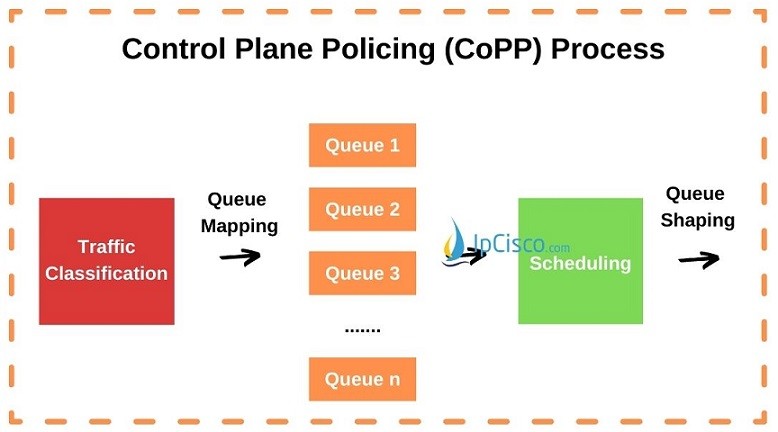 In Classification, traffic flow is classified according to the defined traffic classes.
In Queuing Mapping, different packets types are sent to the different CPU queues. Each of these packets has different scheduling priorities
In Scheduling, one of the queue is selected with a scheduling algorithm and processed. Weighted Round Robin (WRR) scheduling is used in CoPP.
In Queue Shaping, the limit of the CPU queues are determined and with this process CPU do not have an excessive laod.
In Classification, traffic flow is classified according to the defined traffic classes.
In Queuing Mapping, different packets types are sent to the different CPU queues. Each of these packets has different scheduling priorities
In Scheduling, one of the queue is selected with a scheduling algorithm and processed. Weighted Round Robin (WRR) scheduling is used in CoPP.
In Queue Shaping, the limit of the CPU queues are determined and with this process CPU do not have an excessive laod.
How to Secure Control Plane?
As you know we have two main planes in the network equipment like routers and switches. These are “Data Plane” and “Control Plane”. Data Plane is used to forward data and the Control Plane is used to learn how to send this data to the neighbors, in other words, it learns about the protocols. There are various attacks types towards these two systems. Especially, attacks towards the control plane are too much. So, how can we protect our control plane against these network attacks? To protect control plane against network attacks, there are two way. The first way is using the security mechanism of the protocols used in control plane. The other way is using policies. In other words, using Control Plane Policing. Here, we will learn what is Control Plane Policing (CoPP).
What is CoPP?
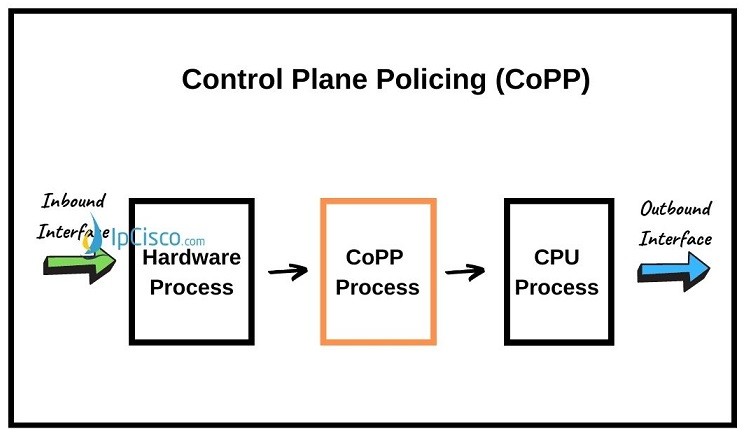
Control Plane Policing (CoPP) is the mechanism that allows us to policy the coming traffic to the Control Plane. Here, CoPP defines traffic classification, queue mapping and queue shaping for control plane packets. This protects Control Plane from malicious network attacks like DoS Attacks. Control Plane Policing (CoPP) uses a Control Plane configuration through Quality of Service module of CoS (Class of Service). In other words, a dedicated configuration is used through QoS CLI (MQC) for Control Plane Policing that filters and limits the traffic coming to the Control Plane. This policy is independent policy that can be used on the device for filtering or any other policing activities. By protecting control plane, Control Plane Policing ensures routing stability, reachability and packet delivery.Control Plane Policing Processes
There are four main processes in Control Plane Policing (CoPP). These CoPP Processes are given below:- Classifying
- Queue Mapping
- Scheduling
- Queue Shaping
In Classification, traffic flow is classified according to the defined traffic classes.
In Queuing Mapping, different packets types are sent to the different CPU queues. Each of these packets has different scheduling priorities
In Scheduling, one of the queue is selected with a scheduling algorithm and processed. Weighted Round Robin (WRR) scheduling is used in CoPP.
In Queue Shaping, the limit of the CPU queues are determined and with this process CPU do not have an excessive laod.
How to Configure CoPP on Cisco Devices?
To configure CoPP, there are six basic steps. Then, how can we configure Control Plane Policing? Let’s learn each of these steps with an example.Enabling MLS QoS
First of all we should enable MLS QoS. To enable MLS QoS globally, we will use “mls qos” command under global configuration mode.Router(config)# mls qos
Defining ACLs
The second step is defining Access List. Here, we will define an Extended Access List as below: Router(config)# ip access-list extended access-list-name After creating Extended Access List, we will enter the Access List lines with “permit” and “deny” lines. According to our need, we can use protocol numbers, tos, time-ranges etc. Router(config-ext-nacl)# {permit | deny} protocol source source-wildcard destination destination-wildcard [precedence precedence] [tos tos] [established] [log | log-input] [time-range time-range-name] [fragments]Defining Packet Classification
After defining Access List, the next step is defining Packet Classification. We will identify the traffic belong to a specific class with “match” command. To define traffic class, we will use “class-map” keyword. Router(config)# class-map traffic-class-name Router(config-cmap)# match {ip precedence} |{ip dscp} | access-groupDefining Service Policy Map
The next step is defining a Service Policy Map with the command “policy-map”. Beside this, in this step, we will associate class with the Service Policy with the command “class” under policy-map configuration. And we will associate the actions to the Service Policy map with “police” command like below: Router(config)# policy-map service-policy-name Router(config-pmap)# class traffic-class-name Router(config-pmap-c)# police {bits-per-second [normal-burst-bytes] [maximum-burst-bytes] [pir peak-rate-bps]} | [conform-action action] [exceed-action action] [violate-action action]Control Plane Config Mode
To enter Control Plane Config mode, we will use “control-plane” command. Router(config)# control-planeApplying QoS Policy
Lastly, we will apply the QoS service policy to the control plane with “service-policy” command under control plane config mode. Router(config-cp)# service-policy input service-policy-nameControl Plane Policing Verification
To verify Control Plane Policing, we can use different commands. These commands are given below:- show policy-map control-plane
- show platform qos ip
- show access-lists coppacl-bgp