BGP Path Attributes – Weight Attribute
Weight Attribute is a Cisco proprietary BGP Path Attribute that is the first step in the BGP Best Path Selection Algorithm. In Cisco devices, BGP firstly check the Weight Attribute value and prefer the Highest Weight Attribute value. Then BGP Best Path selection continues with Local Preference and so on. If the device is not Cisco, this attribute is not important for you. You will start directly with Local Preference Attribute. value to select the BGP Best Path in all other vendor products. During BGP Weight Attribute Configuration, different interfaces of the router are assigned different Weight values. The interface with the highest Weight value is selected and the traffic goes through this interface. Weight value is local on a router that it is configured and it does not exchanged between routers. The highest Weight value is selected always as BGP Best Path or Best Route, if there are multiple routes to the same destination. Weight value can be between 0 and 65535. By default the learned routes has a Weight value 0. This default value is 32768 for locally injected routes. This Cisco Proprietary BGP Path Attribute can be assigned in three ways: • By neighbor command • By AS-Path Access-Lists • By Route Maps Let’s give an example for each of these ways.You can also test yourself on BGP Quizes Section for your BGP Path Attribute knowledge.
BGP Weight Attribute Configuration Example
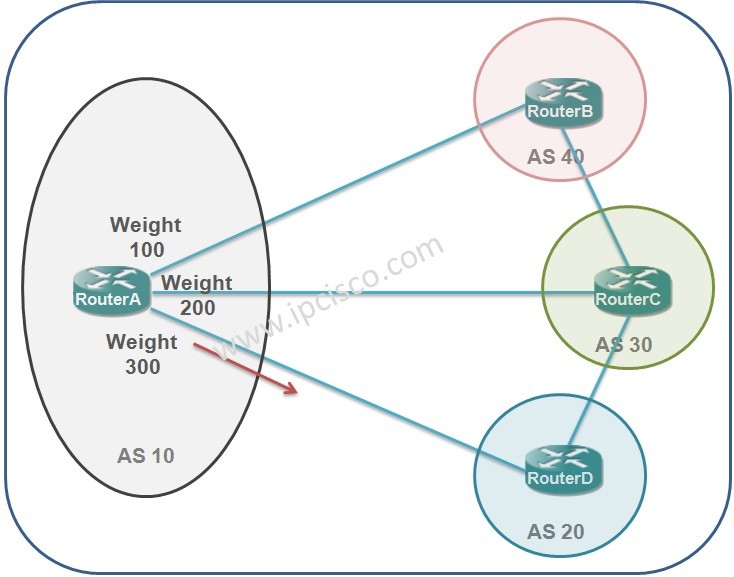
For our Weight Example, as a reference topology, we will use the below basic topology:
Using Neighbor Command
Think about that, you will assign the Cisco proprietary BGP Path Attribute Weight value 100 towards a neighbour, Weight value 200 towards other neighbour and Weight value 300 towards another neighbour. By neighbour command, you can assign Weigh Attribute values like below:Using AS-Path Acess-Lists
You can also configure the same properties by using AS-Path Access-Lists. The AS-Path Access-Lists configuration of the same weight configuration is like below: