BGP Next Hop Self Command

next-hop-self
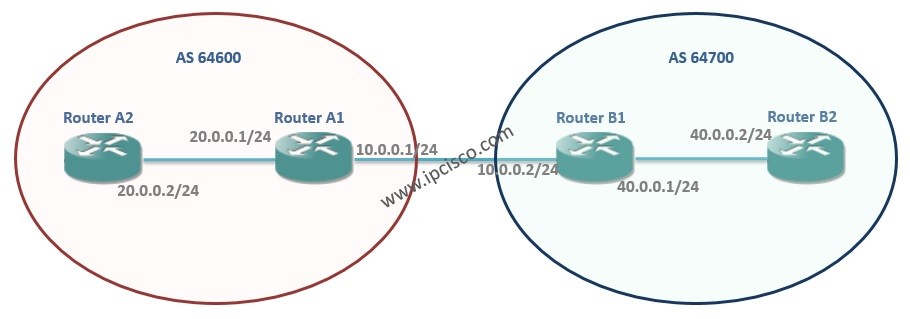
In this post, we will talk about an important and mostly used command of BGP. This command is used under the BGP process in the router and the usage is like below: neighbor {ip-address | peer-group-name} next-hop-self In the routing, route advertisement is a common term. And for the route advertisement, the next hop is common. A route is advertised via its next hop ip address. This means that, “You can come to me via this door”. In BGP configuration, route advertisement is also done between external peers. During this advertisement, the non directly connected routers to this external peer, the IBGP peers, need to learn how to go to the advertised route. Because without any information, they can not go to an unknown place. And their routing table do not have this information. To give this information to the IBGP peers, “next-hop-self” command is used. Let’s see how, with a configuration example. The topology used for this next-hop-self command is below:
bgp next-hop-self command example
 
BGP Next-Hop-Self Command
In this topology, Router A1 and Router B1 are external BGP peers. And the Router A2 and Router B2 are their internal BGP peers. Router A2 advertises its 20.0.0.0/24 network with the next hop 10.0.0.1 (ip address of Router A1’s external interface).Because of the fact that, this 10.0.0.1 ip address is not in the routing table of Router B2, it do not know this route.  
OTHER BGP POSTS...
BGP - Part 1
BGP - Part 2 (BGP Peers, BGP Sessions, BGP Messages)
BGP - Part 3 (IBGP, IBGP Topologies and EBGP)
BGP - Part 4 (BGP Administrative Distance and BGP Path Attributes)
BGP - Part 5 (Packet Tracer BGP Configuration Example)
  This is also like the same for Router B2’s 40.0.0.0/24 route advertisement. This time Router B2 will send 40.0.0.0/24 route with the next hop 10.0.0.2. And the Router A2 will not know this route. Because Router A2 do not know anything about the 10.0.0.2 route.
RouterA1(config)# interface gigabitEthernet 0/0
RouterA1(config-if)# ip address 10.0.0.1 255.255.255.0
RouterA1(config-if)# no shutdown
RouterA1(config-if)# interface gigabitEthernet 0/1
RouterA1(config-if)# ip address 20.0.0.1 255.255.255.0
RouterA1(config-if)# no shutdown
RouterA1(config-if)# exit
RouterA1(config)# router bgp 64600
RouterA1(config-router)# neighbor 10.0.0.2 remote-as 64700
RouterA1(config-router)# neighbor 20.0.0.2 remote-as 64600
RouterA1(config-router)# network 20.0.0.0 mask 255.255.255.0
[sc name=”ContentRMessage”]

Leave A Reply

Your email address will not be published. Required fields are marked *

You May Also Like

Cisco Systems is one of the important vendors in information technology and network field. Many network engineers work with Cisco...
What is NOS? A NOS (Network Operating System) is a special software that is designed for network equipment like router,...
In this EVE-NG VMware installation post, we will focus on one of the popular network emulators, EVE-NG. We will learn...
What is Cisco Live? Cisco Live is a traditional Cisco Event that exist for many years all over the word....