How to COnfigure BGP on Nokia 7750 Service Routers?
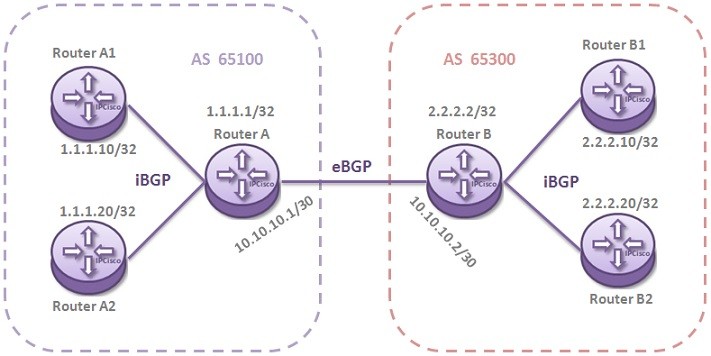
In this lesson, we will see How to Configure BGP on Nokia 7750 Service Routers. Here, we will use Nokia 7750 Service Routers. For our Nokia BGP Configuration Example, we will use the below topology.
You can also download all Nokia Labs, on Nokia Configuration Labs Page.
Let’s start our Nokia BGP Configuration Example.
Firstly we will configure Autonomous System Number on each of the six routers. Out Autonomous System Numbers are 65100 and 65300.
Router A># configure router
Router A#>config>router# autonomous-system 65100
Router A1# configure router
Router A1#>config>router# autonomous-system 65100
Router A2# configure router
Router A2#>config>router# autonomous-system 65100
Router B# configure router
Router B#>config>router# autonomous-system 65300
Router B1# configure router
Router B1#>config>router# autonomous-system 65300
Router B2# configure router
Router B2#>config>router# autonomous-system 65300
Secondly, we will do the configuration for the BGP neighbourship establishment. Here, Router A and Router B will be External neighbours and eBGP will be established between them. We will use the interface addresses for eBGP Neighbourship.
Router A#>config>router# bgp group eBGP
Router A#>config>router>bgp>group$ neighbour 10.10.10.2
Router A#>config>router>bgp>group>neighbour$ peer-as 65300
Router B#>config>router# bgp group eBGP
Router B#>config>router>bgp>group$ neighbour 10.10.10.1
Router B#>config>router>bgp>group>neighbour$ peer-as 65100
Then, between Router A and RouterA1/A2, iBGP session will be established. Like them, iBGP session will be established between Router B and Router B1/B2 too. To configure iBGP, we will use the System Addresses of the Routers. Firstly we will configure Router A and then the other ends Router A1 and Router A2.After that we will commit the configuration.
Router A#>config>router# bgp group iBGP
Router A#>config>router>bgp>group$ neighbour 1.1.1.10
Router A#>config>router>bgp>group>neighbour$ peer-as 65100
Router A#>config>router>bgp>group>neighbour$ back
Router A#>config>router>bgp>group$ neighbour 1.1.1.20
Router A#>config>router>bgp>group>neighbour$ peer-as 65100
Router A#>config>router>bgp>group>neighbour$ commit
[sc name=”ContentRMessage”]