To configure an interface on Nokia Routers, on ALU TiMOS, is a little different that we do on Cisco routers, on Cisco IOS. In Nokia Service Routers, ports are like the interfaces in Cisco devices. Only its name is changing. Beside, the “Interface” name is still being used in Nokia. But it is used to name the Interface. If you do not add the port under this interface, it has no meaning.
If you would like to learn Basic Nokia Router Configuration, you can also check related lesson.
Beside this difference, there is a sepcial interface in Nokia Service Routers. This interface is a special Loopback Interface called “System Address” and it is used in many critical router facilities. With this special System Address, other Loopback interfaces can still being used in a Router.
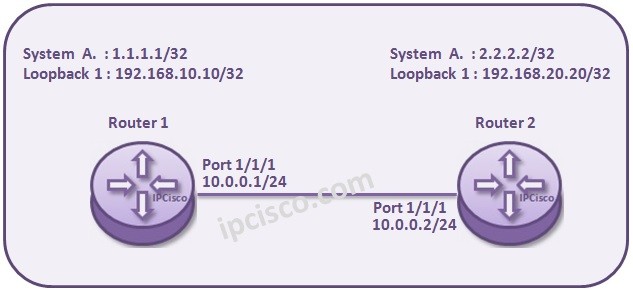
We will show Nokia Service Router Interface Configuration with an example. We will use the below simple topology and the IP addresses given.
As you can see above, we have two routers connected eachother. Let’s configure the interfaces of Router1 and Router2 with these IP addresses.
On Router 1 firstly we will configure the System Address. This is required for all the Nokia Service Routers. We will do this like below:
Router1# configure router
Router1>config>router# interface system
Router1>config>router>if# address 1.1.1.1/32
Router1>config>router>if# back
After System Address configuration, we will configure a Loopback IP address. This is not required always, but we are showing under this topic. Here, the key word “loopback” is important.
Router1>config>router# interface loopback1
Router1>config>router>if# address 192.168.10.10/32
Router1>config>router>if# loopback
Router1>config>router>if# back
After System and Loopback Addresses, it is time to configure a real physical interface between the routers. By the way, in Nokia routers interfaces are logical. Whenever you add a port under it, it become physical.
[sc name=”ContentRMessage”]
As you can see above, we have two routers connected eachother. Let’s configure the interfaces of Router1 and Router2 with these IP addresses.
On Router 1 firstly we will configure the System Address. This is required for all the Nokia Service Routers. We will do this like below:
Router1# configure router
Router1>config>router# interface system
Router1>config>router>if# address 1.1.1.1/32
Router1>config>router>if# back
After System Address configuration, we will configure a Loopback IP address. This is not required always, but we are showing under this topic. Here, the key word “loopback” is important.
Router1>config>router# interface loopback1
Router1>config>router>if# address 192.168.10.10/32
Router1>config>router>if# loopback
Router1>config>router>if# back
After System and Loopback Addresses, it is time to configure a real physical interface between the routers. By the way, in Nokia routers interfaces are logical. Whenever you add a port under it, it become physical.
[sc name=”ContentRMessage”]