In this RADIUS Configuration Example, we will configure RADIUS Server and a Cisco Router for RADIUS Authentication, for the users connected to the router via Cisco switch.
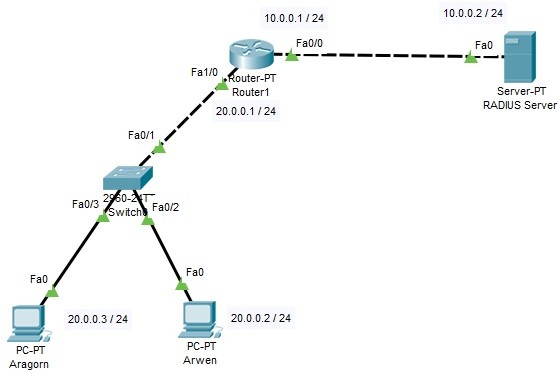
For out RADIUS Configuration Example, we will use the below topology on Cisco Packet Tracer.
How can we configure RADIUS?
In this RADIUS Configuration Example, we will follow some steps on RADIUS Server, Cisco Router and the PCs. These RADIUS Configuration steps are given below:
How can we configure RADIUS?
In this RADIUS Configuration Example, we will follow some steps on RADIUS Server, Cisco Router and the PCs. These RADIUS Configuration steps are given below:
- We will do the IP Configurations on both interfaces of the Router and PCs.
- We will configure RADIUS Server IP Configuration.
- RADIUS Settings on RADIUS Server will be configured.
- Username and Password definitions will be set on RADIUS Server.
- We will focus on the AAA Configurations on the router.
- Laslty, we will verify our RADIUS Configuration.