TCP vs UDP
Before, we have talked about
TCP and
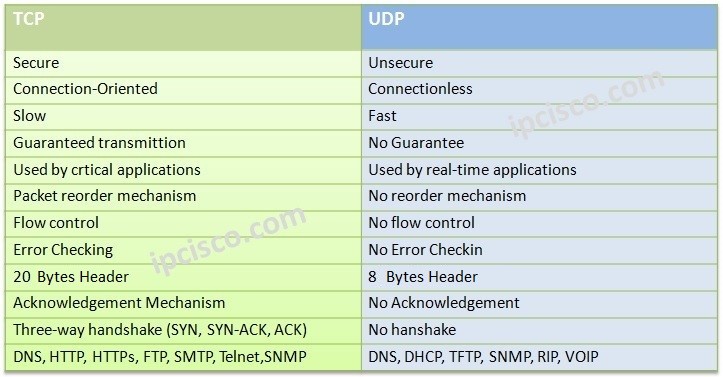
UDP as an overview. Here, we will compare these two protocols’s main characteristics and we will see
TCP vs UDP. This comparison is very important and generally a question asked in a
Network Engineering Technical Interview.
Below, you can find a table that compares
TCP vs UDP.
TCP and UDP Application Ports
Generally Port ranges can be divided into three. These are:
• Well-Known Ports ( 1 to 1024 )
• Registered Ports ( 1025 to 49151 )
• Private Ports ( 49152 to 65535 )
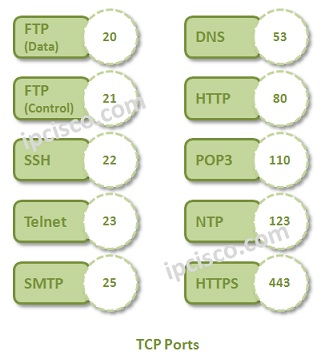
The applications which use TCP Protocol (Transmission Control Protocol) and UDP Protocol (User Datagram Protocol) use Well-Known Ports. Let’s see, some of these Well-Known Ports.
TCP Well-Known Ports
There are some Applications that use
TCP (Transmission Control Protocol) . Some of these Applications are :
• FTP (Port 20,21)
• SSH (Port 22)
• Telnet (Port 23)
• SMTP (Port 25)
• DNS (Port 53)
• HTTP (Port 80)
• POP3 (Port 110)
• SNMP (Port 161)
• SNMP Trap (Port 162)
• HTTPS (Port 443)
etc.
UDP Well-Known Ports
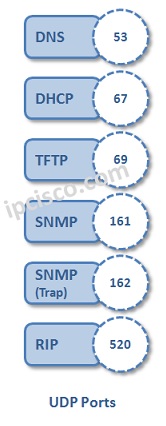
Some network services use UDP and UDP Ports. Some of these services are :
• DNS (Port 53)
• DHCP (Port 67)
• TFTP (Port 69)
• SNMP (Port 161)
• SNMP Trap (Port 162)
• RIP (Port 520)
Etc.
Some these ports can be used for both Protocols. You can find the whole list of this ports at the
IANA Website.
In that list you can also see the ports of other Trasport Layer protocols,
Stream Control Transmission Protocol (SCTP) and
Datagram Congestion Control Protocol (DCCP) beside UDP and TCP.