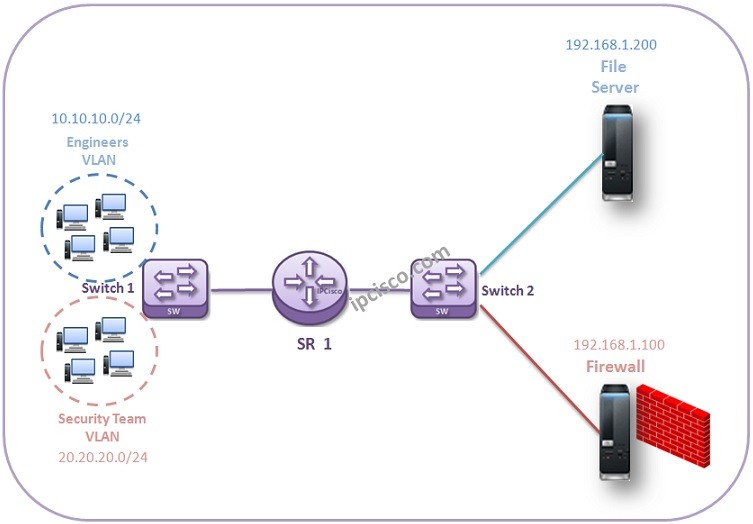
Almost all Network Engineers have realized that, they can access specific subnets and devices but they can not access the others. One of the ways to do this is IP Filters. With IP Filters, specific subnets can be restircted for some services and can be allowed for others. In this Nokia IP Filter Example, we will do a more complex configuration and we will restrict a user goru for a specific device while we allow another user group. For this example, we will restrict engineer group to reach to the Firewall while they can access to the File Server in the same network. For the security team, we will allow to access firewall.
You can also check the first Nokia IP Filter Configuration.
SR1# configure filter SR1>config>filter# ip filter 20 create SR1>config>filter>ip-filter# description AllowServers R1>config>filter>ip-filter# default-action deny SR1>config>filter>ip-filter# entry 1 create SR1>config>filter>ip-filter>entry# match src-ip 10.10.10.0/24 SR1>config>filter>ip-filter>entry# action allow SR1>config>filter>ip-filter>entry# exit SR1>config>filter>ip-filter# entry 2 create SR1>config>filter>ip-filter>entry# match src-ip 20.20.20.0/24 SR1>config>filter>ip-filter>entry# action allow SR1>config>filter>ip-filter>entry# exit
SR1# configure filter SR1>config>filter# ip filter 20 create SR1>config>filter>ip-filter# description AllowServers R1>config>filter>ip-filter# default-action deny SR1>config>filter>ip-filter# entry 1 create SR1>config>filter>ip-filter>entry# match src-ip 10.10.10.0/24 SR1>config>filter>ip-filter>entry# action allow SR1>config>filter>ip-filter>entry# exit SR1>config>filter>ip-filter# entry 2 create SR1>config>filter>ip-filter>entry# match src-ip 20.20.20.0/24 SR1>config>filter>ip-filter>entry# action allow SR1>config>filter>ip-filter>entry# exit
We will add this IP Filter through the inbound interface.
SR1# configure router
SR1>config>router# interface “toSwitch1”
SR1>config>router>if# ingress
SR1>config>router>if>ingress# filter ip 20
Firstly, we have allow both engineers and security team to access the router. Because we create an inbound ip filter. Now, let’s create an outbound filter that allow security team to access Filewall and FileServer. This will also include an entry for engineers FileServer access.
SR1# configure filter
SR1>config>filter# ip filter 30 create
SR1>config>filter>ip-filter# description FileServerAccess
SR1>config>filter>ip-filter# default-action deny
SR1>config>filter>ip-filter# entry 1 create
SR1>config>filter>ip-filter>entry# match src-ip 20.20.20.0/24
SR1>config>filter>ip-filter>entry# action forward
SR1>config>filter>ip-filter>entry# exit
SR1>config>filter>ip-filter# entry 1 create
SR1>config>filter>ip-filter>entry# match src-ip 10.10.10.0/24
SR1>config>filter>ip-filter>entry# match dst-ip 192.168.1.200/24
SR1>config>filter>ip-filter>entry# action forward
SR1>config>filter>ip-filter>entry# exit
After Nokia IP Filter creation, we will add this interface through egress. If a restricted access try is done, at this point it will be restricted.
SR1# configure router
SR1>config>router# interface “toSwitch2”
SR1>config>router>if# egress
SR1>config>router>if>egress# filter ip 30
In this Nokia IP Filter Example, we denied to access Firewall except Security Team while other team Engineers can access the FileServer in the same network with Firewall.
[sc name=”ContentRMessage”]