PPP Configuration on Cisco Routers
In this lesson, we will talk about
PPP Configuration (Point-to-Point Protocol Configuration) on Cisco Routers. We will learn configuration commands for this general standard wan connection.
In our
PPP Configuration example, we will use the below basic topology:
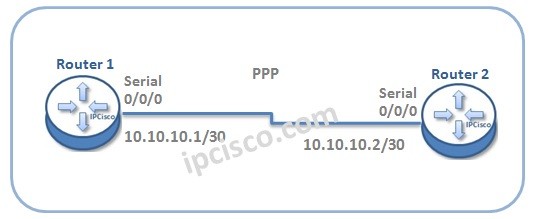
Now, do not waste time and let’s start to
configure PPP for this topology.
Enabling PPP
To configure
Point-to-Point Protocol, firstly we will
enable PPP and after that, we will configure the interface
ip addresses.
Router1>enable
Router1# configure terminal
Router1(config) # interface Serial 0/0/0
Router1(config-if) # encapsulation ppp
Router1(config-if) # ip address 10.10.10.1 255.255.255.252
Router1(config-if) # exit
Now, let’s configure Router 2 for PPP like above. Here, only the ip address of the interface will be changed. All the other configurations steps will be same.
Router2>enable
Router2# configure terminal
Router2(config) # interface Serial 0/0/0
Router2(config-if) # encapsulation ppp
Router2(config-if) # ip address 10.10.10.2 255.255.255.252
Router2(config-if) # exit
[sc name=”ContentRMessage”]