


HDLC Configuration on Cisco

  • January 17, 2018
cisco-hdlc-configuration
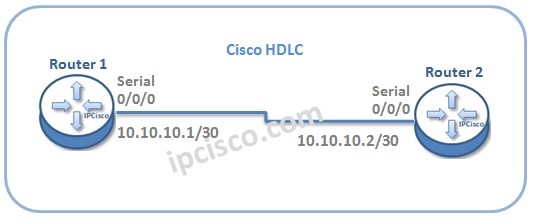
In this lesson, we will talk about HDLC configuration on Cisco Routers. Cisco HDLC has a different proprietary field in the data field of the protocol. For our Cisco HDLC Configuration example, we will use the below basic topology: cisco-hdlc-configuration Let’s start to configure Cisco HDLC for this topology.

Enabling Cisco HDLC

To configure Cisco HDLC, firstly we will enable HDLC and after that, we will configure interface ip addresses.


Router1>enable
Router1# configure terminal
Router1(config) # interface Serial 0/0/0
Router1(config-if) # encapsulation hdlc
Router1(config-if) # ip address 10.10.10.1 255.255.255.252
Router1(config-if) # exit
Now, let’s configure Router 2 for HDLC like above. [sc name=”ContentRMessage”]

Tags:

Share:

Leave A Reply

Your email address will not be published. Required fields are marked *

You May Also Like

Cisco Systems is one of the important vendors in information technology and network field. Many network engineers work with Cisco...
What is NOS? A NOS (Network Operating System) is a special software that is designed for network equipment like router,...

SFP

SFP (Small Form-factor Pluggable) is a hot-pluggable network interface module used in the network devices of today’s computer networks. In...
Network engineers need practice on routers and switches. They use different emulators and simulators to gain hands on experience on...


