In this article, we will focus on how to configure IES (Internet Enhanced Services) on Nokia Service Routers, we will learn Nokia IES Configuration. Here, our Service Router will be Nokia SR 7750.
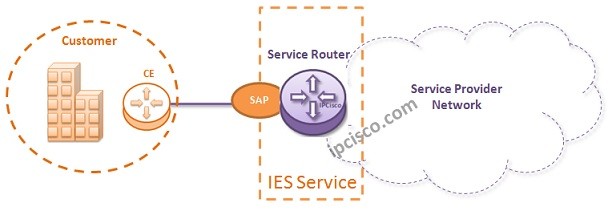
For our IES Example, we will use the below topology:
Now, let’s configure IES Service for this topology.
Firstly, we will create a customer with Customer-ID 3.
Nokia-router>config # customer 3 create
Then, we will create our IES (Internet Enhanced Services)and we will associate this Service to the Customer. Our IES Service-ID wll be 50. We, will also add a description to this IES.
Nokia-router>config # ies 50 customer 3 create
Nokia-router>config>service>ies# description “IES-Internet-Connection”
Now, we will create IES Interface. We will create our IES Interface with a name and then we will assign an IP address to this interface.
Nokia-router>config>service>ies# interface “Our-IES-Interface” create
Nokia-router>config>service>ies>if# address 172.16.1.1/24
It is time to assign a SAP under this IES Interface.
Nokia-router>config>service>ies>if# sap 1/1/1 create
Nokia-router>config>service>ies>if# exit
[sc name=”ContentRMessage”]