GVRPis the standard based counterpart of Cisco VTP. In this configuration example, we will focus on how to configure GVRP on Huawei switches.
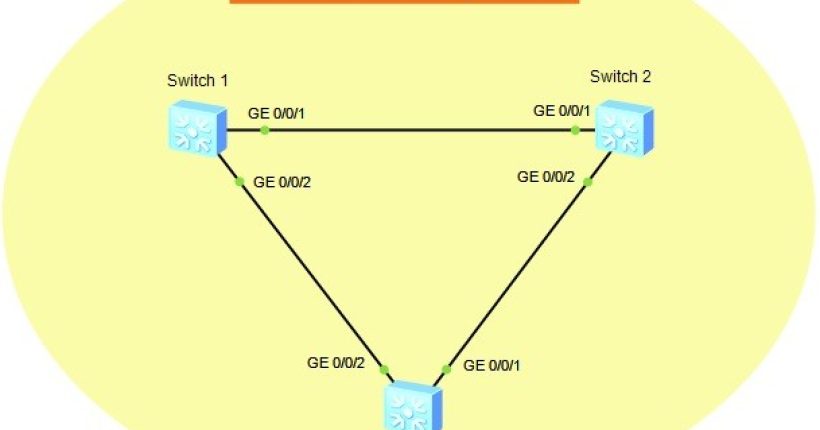
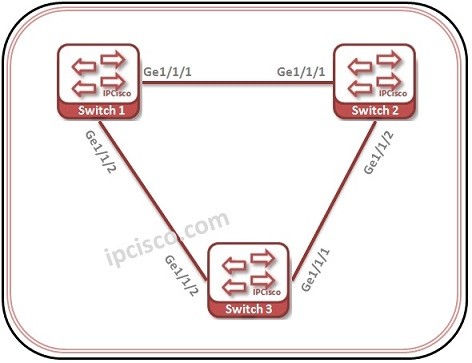
For out Huawei GVRP Configuration example, we will use the topology below.
On important reminding. Do not think that there can be a loop on this topology. STP mechanisms prohibit this.
Let’s start our GVRP Configuration on each device.
On important reminding. Do not think that there can be a loop on this topology. STP mechanisms prohibit this.
Let’s start our GVRP Configuration on each device.
You can download thic configuration on Huawei eNSP Labs Page.
Huawei-Switch 1 Configuration
Firstly, we will enable GVRP Globally on the switch. < Huawei-Switch1 > system-view [Huawei-Switch1] gvrp Secondly, we will configure the first interface as trunk and we will allow all the VLANs to pass through this interfaces. [Huawei-Switch1] interface GigabitEthernet 1/1/1 [Huawei-Switch1-GigabitEthernet1/1/1] port link type trunk [Huawei-Switch1-GigabitEthernet1/1/1] port trunk allow-pass vlan all Then, we will enable GVRP on the interface and we will configure its registration type. There are three types of registration as we talked about before. “Normal”, “Fixed” and “Forbidden”. Here we will use “fixed” type. [Huawei-Switch1-GigabitEthernet1/1/1] gvrp [Huawei-Switch1-GigabitEthernet1/1/1] gvrp registration fixed [Huawei-Switch1-GigabitEthernet1/1/1] quit We will configure the second interface similar. [Huawei-Switch1] interface GigabitEthernet 1/1/2 [Huawei-Switch1-GigabitEthernet1/1/2] port link type trunk [Huawei-Switch1-GigabitEthernet1/1/2] port trunk allow-pass vlan all [Huawei-Switch1-GigabitEthernet1/1/2] gvrp [Huawei-Switch1-GigabitEthernet1/1/2] gvrp registration fixedHuawei-Switch 2 Configuration
On Switch 2, we will do the similar configuration of Switch 1. < Huawei-Switch2 > system-view [Huawei-Switch2] gvrp [Huawei-Switch2] interface GigabitEthernet 1/1/1 [Huawei-Switch2-GigabitEthernet1/1/1] port link type trunk [Huawei-Switch2-GigabitEthernet1/1/1] port trunk allow-pass vlan all [Huawei-Switch2-GigabitEthernet1/1/1] gvrp [Huawei-Switch2-GigabitEthernet1/1/1] gvrp registration fixed [Huawei-Switch2-GigabitEthernet1/1/1] quit