MVRP is the protocol that provides
dynamic VLAN registration and creation. The counterparts of
MVRP are
Cisco VTP and
standard GVRP. MVRP is an enhanced version of these protocols.
Here, we will focus on how to configure MVRP in
Juniper switches. We will use
EX Series of Juniper for this MVRP Configuration example.
For our
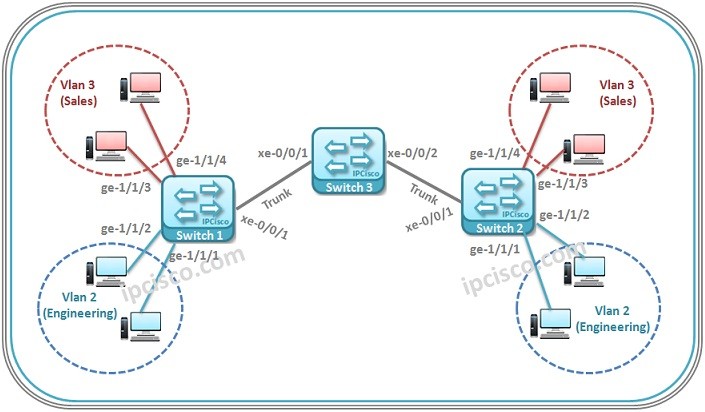
MVRP Example, we will use the below VLAN topology.
Let’s start our
MVRP Configuration.
Switch 1 Configuration
Firstly we will create our VLANs on Switch 1. We will do this with “
set vlan vlan-name vlan-id vlan-id” command.
juniper@Switch-1> edit

[edit]
juniper@Switch-1# set vlans engineers vlan-id 2

[edit]
juniper@Switch-1# set vlans sales vlan–id 3
Then, we will assign interfaces to these VLANs.
[edit]
juniper@Switch-1# set interfaces ge-1/1/1 unit 0 family ethernet-switching vlan members engineers
[edit]
juniper@Switch-1# set interfaces ge-1/1/2 unit 0 family ethernet-switching vlan members engineers

[edit]
juniper@Switch-1# set interfaces ge-1/1/3 unit 0 family ethernet-switching vlan members sales

[edit]
juniper@Switch-1# set interfaces ge-1/1/4unit 0 family ethernet-switching vlan members sales
After that, we will configure the Trunk Interface.
[edit]
juniper@Switch-1# set interfaces xe-0/0/1 unit 0 family ethernet-switching port-mode trunk
And now it is time to configure MVRP. We will enable MVRP on the Trunk Interface.
[edit]
juniper@Switch-1# set protocols mvrp interface xe-0/0/1.0
[sc name=”ContentRMessage”]
Other GVRP, MVRP and VTP Articles…
GVRP Overview
GVRP Configuration on Cisco
GVRP Configuration on Huawei
MVRP Overview
MVRP Configuration on Cisco
MVRP Configuration on Juniper