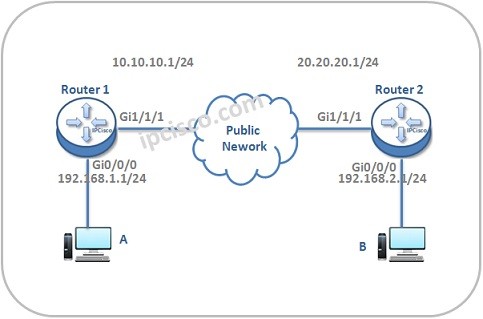
In this lesson we will see IPSec VPN Configuration On Huawei Routers. IPSec configurations has some basic steps.
These steps are given below:
Now, let’s start the configuration on each router.
- IPSec Authentication and Encryption Configuration
- IPSec Policy Configuration
- IPSec Interface Association
- IPSec Configuration Verification
You can download this configuration on Huawei eNSP Labs Page.
IPSec Authentication and Encryption Configuration
Firstly, we will configure authentication and encription mode. To do this, we will enter the “ipsec proposal tran” command. Our authentication algorithm will be SHA-2 and we will use AES as encryption algorithm. Firstly we will configure Router 1. [Huawei-Router1] ipsec proposal tran [Huawei-Router1-ipsec-proposal-trans1] esp authentication-algorithm sha2 [Huawei-Router1-ipsec-proposal-trans1] esp encryption-algorithm aes [Huawei-Router1-ipsec-proposal-trans1] quit Then, we will configure IPSec with the same commands on Router 2 too. [Huawei-Router2] ipsec proposal tran [Huawei-Router2-ipsec-proposal-trans1] esp authentication-algorithm sha2 [Huawei-Router2-ipsec-proposal-trans1] esp encryption-algorithm aes [Huawei-Router2-ipsec-proposal-trans1] quit [sc name=”ContentRMessage”] Other IPSec VPN Lessons: IPSec VPN – IPSec VPN Overview IPSec VPN – IPSec VPN Configuration on Huawei Routers