Link Aggregation on Cisco IOS XR

cisco-xr-bundle-topology-ipcisco
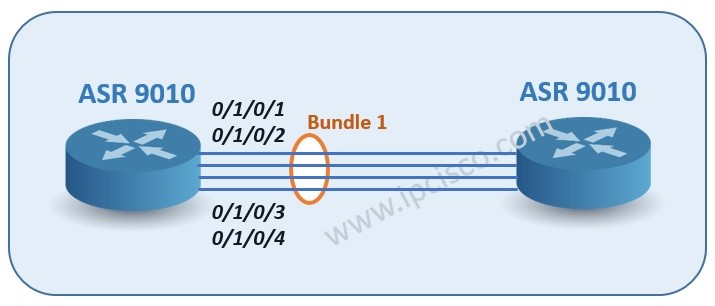
Link aggregation, LAG, Bundle, EtherChannel, what ever you say, they have the same logic in real. So, the configuration logic of Link Aggregation (LAG) is not different than Ether Channel logic on Cisco devices that run Cisco XR software. Here, again the bundle is created and the ports are made to join to this bundle. And the same bundle members become like a single link together.
We will use the basic topology includes two ASR 9010 series like below.
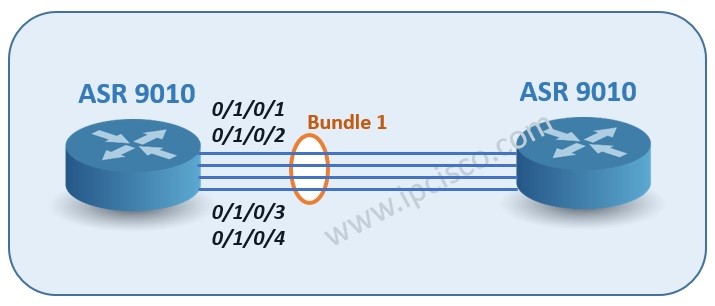
cisco-xr-bundle-topology-ipcisco

Let’s see Link Aggragation (LAG) configuration on Cisco XR step by step. Here, I will use Cisco ASR 9010 series for the configuration. 1. Firstly, let’s create a bundle on our router ASR 9010.


RP/0/RSP0/CPU0:asr9010_ipcisco(config)# # interface Bundle-Ether1
RP/0/RSP0/CPU0:asr9010_ipcisco(config-if)# description our_xr_bundle_istanbul_to_ankara
RP/0/RSP0/CPU0:asr9010_ipcisco(config-if)# mtu 9216
RP/0/RSP0/CPU0:asr9010_ipcisco(config-if)# bundle minimum-active links 3
RP/0/RSP0/CPU0:asr9010_ipcisco(config-if)# load interval 30
Here, our bundle type is Ethernet, because we want to aggregate Ethernet links. We are adding an optional description to our bundle and we are entering the mtu value. This mtu value can be given according to your companies values. We are configuring the minimum active links that means that if there are less links than this value, then bundle will be down. Lastly, we are adding load interval value as 30 seconds. This value is load calculation interval value. 2. Now, it is time to add intetfaces, under this Bundle.
RP/0/RSP0/CPU0:asr9010_ipcisco(config)# interface TenGigE0/1/0/1
RP/0/RSP0/CPU0:asr9010_ipcisco(config-if)# description bundle_1_link_1
RP/0/RSP0/CPU0:asr9010_ipcisco(config-if)# bundle id 1 mode active
RP/0/RSP0/CPU0:asr9010_ipcisco(config-if)# load interval 30
RP/0/RSP0/CPU0:asr9010_ipcisco(config-if)# exit

RP/0/RSP0/CPU0:asr9010_ipcisco(config)# interface TenGigE0/1/0/2
RP/0/RSP0/CPU0:asr9010_ipcisco(config-if)# description bundle_2_link_1
RP/0/RSP0/CPU0:asr9010_ipcisco(config-if)# bundle id 1 mode active
RP/0/RSP0/CPU0:asr9010_ipcisco(config-if)# load interval 30
RP/0/RSP0/CPU0:asr9010_ipcisco(config-if)# exit
[sc name=”ContentRMessage”]

Leave A Reply

Your email address will not be published. Required fields are marked *

You May Also Like

Cisco Systems is one of the important vendors in information technology and network field. Many network engineers work with Cisco...
What is NOS? A NOS (Network Operating System) is a special software that is designed for network equipment like router,...
In this EVE-NG VMware installation post, we will focus on one of the popular network emulators, EVE-NG. We will learn...
What is Cisco Live? Cisco Live is a traditional Cisco Event that exist for many years all over the word....