


Neighbour Discovery Protocols – Part 6 ( LLDP Cisco Configuration)

  • March 8, 2016
lldp-neighbour-discovery
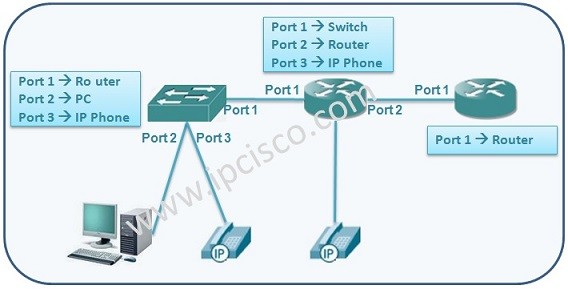
In this configuration lesson, we will focus on Cisco LLDP Configuration. To understand LLDP better, let’s check the configuration of LLDP on the Cisco IOS. The most important commands related with LLDP configuration is showed below.  
LLDP Configuration Topology
LLDP is disabled by default. To enable LLDP on the device, use “lldp run” on the global configuration mode. Again, “no lldp run” is used to disable lldp on that device.   RouterA(config)# lldp run RouterA(config)# no lldp run
 
 
To specify the TLVs on the device, use “lldp med-tlv-select tlv” command. Here, tlv can be inventory-management, power-management, network-policy, location etc.   RouterA(config)# lldp med-tlv-select tlv
 
 
Like other protocols, LLDP (Link Layer Discovery Protocol) has also timers. The default values of reinit is 2, timer is 30 and holdtime is 120. Reinit is the initialization delay. Timer is the update time. And holdtime is the time that it waits without an update and then discards the entry.   LLDP timers can be configured like below:   [sc name=”ContentRMessage”]

Leave A Reply

Your email address will not be published. Required fields are marked *

You May Also Like

Cisco Systems is one of the important vendors in information technology and network field. Many network engineers work with Cisco...
What is NOS? A NOS (Network Operating System) is a special software that is designed for network equipment like router,...

SFP

SFP (Small Form-factor Pluggable) is a hot-pluggable network interface module used in the network devices of today’s computer networks. In...
Network engineers need practice on routers and switches. They use different emulators and simulators to gain hands on experience on...



