RIP Configuration With Packet Tracer

  • February 21, 2016
rip-configuration-example

Packet Tracer RIP Configuration

In this RIP Cisco Configuration lesson, we will focus on how to configure RIP (Routing Information Protocol) on Cisco Routers. Generally in all network courses, RIP is used to explain routing protocol configuration basically. This is because of its basic configuration.
You can DOWNLOAD the Packet Tracer example with .pkt format HERE.

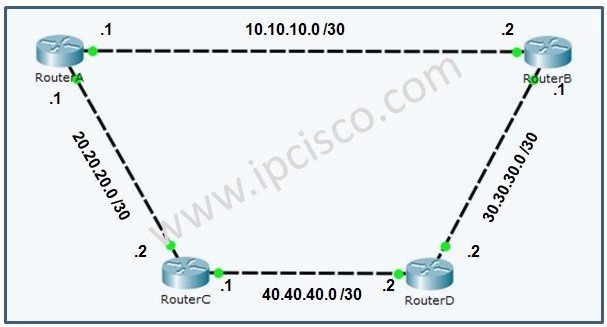
For our example, we will use the following basic topology:
RIP (Routing Information Protocol)
RIP Example Topology
With this topology, the IP addresses are configured. We will pass the configuration of IP addresses and continue only the routing protocol, RIP Cisco Configuration. Before the configuration of RIP, let’s check the routing table of RouterA.
RouterA# show ip route 
Codes: C - connected, S - static, I - IGRP, R - RIP, M - mobile, B - BGP
       D - EIGRP, EX - EIGRP external, O - OSPF, IA - OSPF inter area
       N1 - OSPF NSSA external type 1, N2 - OSPF NSSA external type 2
       E1 - OSPF external type 1, E2 - OSPF external type 2, E - EGP
       i - IS-IS, L1 - IS-IS level-1, L2 - IS-IS level-2, ia - IS-IS inter area
       * - candidate default, U - per-user static route, o - ODR
       P - periodic downloaded static route

Gateway of last resort is not set

     10.0.0.0/30 is subnetted, 1 subnets
C       10.10.10.0 is directly connected, FastEthernet0/0
     20.0.0.0/30 is subnetted, 1 subnets
C       20.20.20.0 is directly connected, FastEthernet0/1


To learn Cisco Packet Tracer Configurations, You can also check Cisco Packet Tarcer Lab Course.

RouterA# show ip protocols

RouterA# show ip int brief 
Interface              IP-Address      OK? Method Status                Protocol
 
FastEthernet0/0        10.10.10.1      YES manual up                    up
FastEthernet0/1        20.20.20.1      YES manual up                    up
 
Vlan1                  unassigned      YES unset  administratively down down
As you can see, there is only directly connected neighbours in the routing table of RouterA. RouterA do not know any other networks, also RouterD. There is no routing protocol configured on RouterA.
Firstly RouterA is configured like below with network commands under rip process.

RouterA(config)# router rip 
RouterA(config-router)# version 2
RouterA(config-router)# network 10.10.10.0
RouterA(config-router)# network 20.20.20.0

[sc name=”ContentRMessage”]
You can download “Packet Tracer” in Tools section.

Other RIP Lessons Routing Information Protocol – RIP Overview Routing Information Protocol – RIP Configuration With Packet Tracer Routing Information Protocol – RIP Configuration on Juniper Routing Information Protocol – RIPng Overview Routing Information Protocol – RIPng Confiugration on Cisco IOS Routing Information Protocol – RIPng Configuration on Huawei Dynamic Routing Protocols
You can check the other Packet Tracer Examples below:
Common Cisco Router Configuration Example on Packet Tracer Router DHCP Configuration Example on Packet Tracer VTP Configuration Example on Packet Tracer VLAN Configuration Example on Packet Tracer STP Configuration Example on Packet Tracer BGP Configuration Example on Packet Tracer Port Security Configuration Example on Packet Tracer RIP Configuration Example on Packet Tracer CDP Configuration Example on Packet Tracer OSPF Area Types Example on Packet Tracer (Standard and Backbone Areas) OSPF External Routes Example on Packet Tracer OSPF Area Types Example on Packet Tracer (Stub, NSSA, Totally Stubby, Totally NSSA Areas)

Leave A Reply

Your email address will not be published. Required fields are marked *

You May Also Like

Cisco Systems is one of the important vendors in information technology and network field. Many network engineers work with Cisco...
What is NOS? A NOS (Network Operating System) is a special software that is designed for network equipment like router,...

SFP

SFP (Small Form-factor Pluggable) is a hot-pluggable network interface module used in the network devices of today’s computer networks. In...
Network engineers need practice on routers and switches. They use different emulators and simulators to gain hands on experience on...