Not So Stubby Area (NSSA)
Not So Stubby Area name is the most funny name in network world, I think : ) Funny and useful. With NSSA, the
External LSAs (Type 5) that is not accepted by Stub Areas, accepted as
Type 7.
Normally,
NSSA are do not accept
Type 5 LSAs. But it convert
Type 5 to
Type 7 and then accept. After NSSA, at the ABR, this convert process is done again and
Type 7 LSAs is converted to
Type 5 LSAs.
 OSPF NSSA with Accepted LSAs
The routes that is related to
Type 7 LSAs, will be like
N1 and
N2 routes in the routing table.The difference between these two route type is explained before.
In NSSA,
Summary LSA Type 3 is accepted like Stub Area. Beside, if a default-information originate command is used in ABR, default-route is also accepted.
To configure NSSA, all the routers in the area need to be configured as NSSA. This configuration is like below:
router ospf 1
area 10 nssa
For default-route, the below command is used:
area 10 nssa default-information-originate
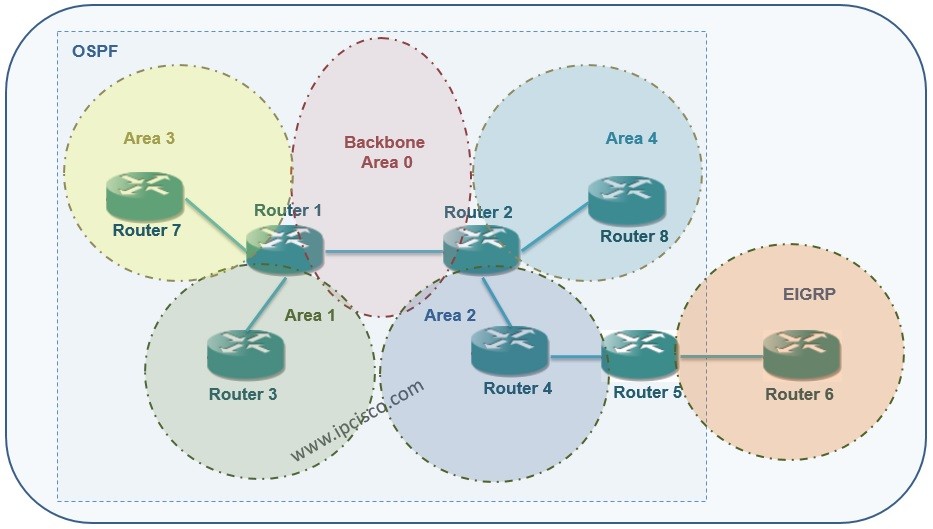
On our main topology, we will configure the Area 2 as not so stubby area (NSSA). The not so stubby area (NSSA) configuration will be like below on Router2, Router4 and Router5:
Router2(config)# router ospf 1
Router2(config-router)# area 2 nssa
Router4(config)# router ospf 1

Router4(config-router)# area 2 nssa
Router6(config)# router ospf 1
Router6(config-router)# area 2 nssa
After this configuration, the
show ip route output will be like below:
[sc name=”ContentRMessage”]