As we talked about,
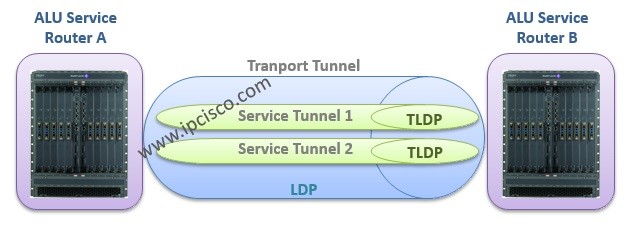
LSRs(P routers) are not service avare, they do not know anything about services. So they use only the outer label. But PE routers are service avare and they use outer and inner label together. With inner label, they classfy the different VPNs. At this point, at the PE routers,
T-LDP is used to signal service labels associated with the service tunnels. Thus, they identify the particular VPN traffic.
 Transport Tunnel and Service Tunnel, LDP and TLDP
T-LDP
Transport Tunnel and Service Tunnel, LDP and TLDP
T-LDP is used to exchange labels for
layer 2 service. For
layer 3 services,
MP-BGP is used. MP-BGP will be discussed in another article.
L2 VPN service configuration can be done in different combination of protocols. These combinations are:
– Transport Tunnel
LDP and Service Tunnel
T-LDP
– Transport Tunnel
RSVP and Service Tunnel
T-LDP
– Transport Tunnel
LDP and Service Tunnel
static via static label configuration
– Transport Tunnel
RSVP and Service Tunnel
static via static label configuration
In
T-LDP, peers do not need to be directly connected (between PEs that have services configuration, as you know there can be many Ps between PEs).
LDP => between directly connected peers
T-LDP => non-directly connected peers
T-LDP processes are similar to the LDP. Discovery Hello messages are sent for TLDP adjacency. AFter that Init messages are sent for session establishment. Then keepalive messages are sent to keep the connection up. Here, only one difference at Hallo messages. Because in TLDP Hello messages are sent via
unicast,
not multicast like LDP Hellos.
When you enable LDP, TLDP is also enabled. After LDP configuration you can check this with
“Show router status” command. If you want to change this default behaviour, you can use the below commands:
A:> config router ldp
	targeted-session
		disable-targeted-session
T-LDP sessions can be established in two ways:
Automatic : In ALU routers this is done by configuring
SDP(Service Distribution Point).
Manually : Configurad by administrator (both side must be configured properly).
A:> config router ldp
	targeted-session
		peer 2.2.2.2
		exit
For verification of TLDP you can use the below commands that you use for LDP:
show router ldp peer
show router ldp session
show router ldp status
[sc name="ContentRMessage"]