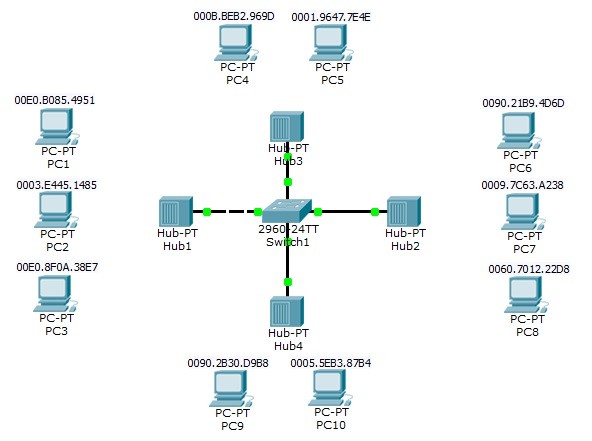
In this article, we will focus on detailed Port Security Cisco Configuration. For our Cisco Port Security Configuration, we will use the below topology. In this topology we will make examples for the configuration cases on Port Security.
You can DOWNLOAD the Packet Tracer example with .pkt format HERE.
You can download all Cisco Packet Tracer Labs on Cisco Packet Tracer Labs Page.

1.port
2.port
- max MAC 2
- 1 static MAC (PC1)
- 1 dynamic MAC (PC2)
- 1 violation (PC3)
- violation type shutdown
Switch(config)# interface fastEthernet 0/1 Switch(config-if)# switchport mode access Switch(config-if)# switchport port-security Switch(config-if)# switchport port-security maximum 2 Switch(config-if)# switchport port-security mac-address 00E0.B085.4951 Switch(config-if)# switchport port-security mac-address 0003.e445.1485 Switch(config-if)# switchport port-security violation shutdown
2.port
- max MAC 2
- 2 dynamic MAC (PC6,PC7)
- 1 violation (PC8)
- violation type restrict
Switch(config)# interface fastEthernet 0/2 Switch(config-if)# switchport mode access Switch(config-if)# switchport port-security Switch(config-if)# switchport port-security maximum 2 Switch(config-if)# switchport port-security mac-address sticky Switch(config-if)# switchport port-security violation restrict
3.port
- max MAC 1
- 1 static MAC (PC4)
- 2 violation (PC4,PC5)
- violation type shutdown
Switch(config)# inter fastEthernet 0/3 Switch(config-if)# switchport mode access Switch(config-if)# switchport port-security maximum 1 Switch(config-if)# switchport port-security mac-address 1111.1111.1111 Switch(config-if)# switchport port-security violation shutdown
4.port
- max MAC 1
- 1 dynamic MAC (PC10)
- 1 violation (PC9)
- violation type protect
Switch(config)# inter fastEthernet 0/4 Switch(config-if)# switchport mode access Switch(config-if)# switchport port-security Switch(config-if)# switchport port-security maximum 1 Switch(config-if)# switchport port-security mac-address sticky Switch(config-if)# switchport port-security violation protectAfter this Port Security configuration, connect the PC’s one by one. After this process, you will see that the Port Security configuration on switch, will avoid the unwanted devices and limit the max number of MAC addresses as configured.
You can also check the below Port Security verification commands screenshots.
Switch# show port-security Secure Port MaxSecureAddr CurrentAddr SecurityViolation Security Action (Count) (Count) (Count) ——————————————————————– Fa0/1 2 2 1 Shutdown Fa0/2 2 2 1 Restrict Fa0/3 1 1 1 Shutdown Fa0/4 1 1 1 Protect ———————————————————————-
Switch# show port-security address Secure Mac Address Table ——————————————————————————- Vlan Mac Address Type Ports Remaining Age (mins) —- ———– —- —– ————- 1 0003.E445.1485 SecureConfigured FastEthernet0/1 – 1 00E0.B085.4951 SecureConfigured FastEthernet0/1 – 1 0090.21B9.4D6D SecureSticky FastEthernet0/2 – 1 0009.7C63.A238 SecureSticky FastEthernet0/2 – 1 1111.1111.1111 SecureConfigured FastEthernet0/3 – 1 0009.7C63.A238 SecureSticky FastEthernet0/4 – ——————————————————————————
Switch# show port-security interface fastEthernet 0/1 Port Security : Enabled Port Status : Secure-up Violation Mode : Shutdown Aging Time : 0 mins Aging Type : Absolute SecureStatic Address Aging : Disabled Maximum MAC Addresses : 2 Total MAC Addresses : 2 Configured MAC Addresses : 2 Sticky MAC Addresses : 0 Last Source Address:Vlan : 0000.0000.0000:0 Security Violation Count : 1
Switch# show port-security interface fastEthernet 0/2 Port Security : Enabled Port Status : Secure-up Violation Mode : Restrict Aging Time : 0 mins Aging Type : Absolute SecureStatic Address Aging : Disabled Maximum MAC Addresses : 2 Total MAC Addresses : 2 Configured MAC Addresses : 0 Sticky MAC Addresses : 2 Last Source Address:Vlan : 0000.0000.0000:0 Security Violation Count : 1
Switch# show port-security interface fastEthernet 0/3 Port Security : Enabled Port Status : Secure-up Violation Mode : Shutdown Aging Time : 0 mins Aging Type : Absolute SecureStatic Address Aging : Disabled Maximum MAC Addresses : 1 Total MAC Addresses : 1 Configured MAC Addresses : 1 Sticky MAC Addresses : 0 Last Source Address:Vlan : 0000.0000.0000:0 Security Violation Count : 1
Switch# show port-security interface fastEthernet 0/4 Port Security : Enabled Port Status : Secure-up Violation Mode : Protect Aging Time : 0 mins Aging Type : Absolute SecureStatic Address Aging : Disabled Maximum MAC Addresses : 1 Total MAC Addresses : 1 Configured MAC Addresses : 0 Sticky MAC Addresses : 0 Last Source Address:Vlan : 0000.0000.0000:0 Security Violation Count : 1
In this example we have done Port Security configuration for our basic topology on Packet Tracer. After Port Security configuration, we have checked our Port Security configuration with Port Security verification commands.
You can DOWNLOAD the Packet Tracer example with .pkt format HERE.