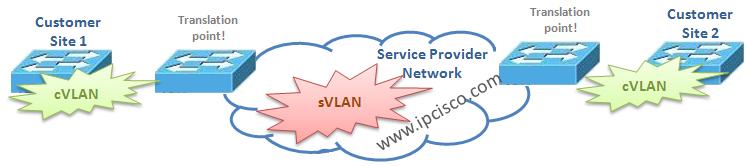
Virtual LANs (VLANs) are very important for a network. Sometimes network engineers need to map VLANs to VLANs. This is called VLAN Mapping. In other words, on Cisco devices, VLAN Mapping term is used for mentioning the swap of incoming VLAN id to a new VLAN id. In the below configuration examples, we will see Cisco configuration for this swapping. Here, we will learn how to configure VLAN Mapping on Cisco swicthes.
If you want to check Cisco VLAN Configuration before this lesson, you can check our Cisco Packet Tracer VLAN Configuration Example.
Let’s start our configuration steps one by one. The related VLAN mapping configuration steps are given below:

Other VLAN Mapping Lessons :
VLAN Mapping (VLAN Translation) – Part 1
VLAN Mapping (VLAN Translation) on Cisco IOS – Part 2
VLAN Mapping (VLAN Translation) on Juniper JUNOS – Part 3
Other VLAN Lessons :
VLAN – Part 1
VLAN – Part 2 (VLAN Assignments and VLAN Port Types)
VLAN – Part 3 (VLAN Frame Tagging Protocols, ISL and Dot1.q)
VLAN – Part 4 (How to Configure Cisco VLANs)
VLAN – Part 5 (Packet Tracer VLAN Configuration Example)
Switch# configure terminalSwitch(config)# interface interface-idSwitch(config-if)# switchport mode trunkSwitch(config-if)# switchport vlan mapping vlan-id translated-idSwitch(config-if)# end
And to verify our configuration, the below command scan be used:
Switch# show vlan mapping
Switch# copy running-config startup-config
As an example, we can configure the customer 10,20,30 and 40 VLANs (C-VLAN s) to the Service provider VLANs (S-VLAN s), 110, 120, 130 and 140.
Switch(config)# interface gigabiethernet 0/1Switch(config-if)# switchport vlan mapping 10 110Switch(config-if)# switchport vlan mapping 20 120Switch(config-if)# switchport vlan mapping 30 130Switch(config-if)# switchport vlan mapping 40 140Switch(config-if)# exit
VLAN Mapping CVLAN SVLAN
Q-in-Q Mapping on a Trunk Port
By default all the packets in a tunnel mapped to the configured S-VLAN . In the example below, VLAN 1 to 4 is configured as allowed VLAN in the trunk. By default this means that these VLAN tagged packets will be allowed by Service Provider. The related configuration commands for q-in-q mapping on a trunk is given below:Switch# configure terminalSwitch(config)# interface gigabiethernet0/1Switch(config-if)# switchport mode trunkSwitch(config-if)# switchport trunk allowed vlan 1-4Switch(config-if)# end
But we can select the VLAN by selective Q-in-Q. In the below example we configure the mapping for C-VLAN 1-4 to the VLAN 100. Th other traffic than VLAN 1-4 will be dropped.
Switch(config)# interface gigabiethernet0/1Switch(config-if)# switchport vlan mapping 1-4 dot1q-tunnel 100Switch(config-if)# exit
To verify our configuraiton we will use the below verification command, “show interfaces gigabiethernet0/1 vlan mapping“.
[sc name=”ContentRMessage”]
Switch# show interfaces gigabiethernet0/1 vlan mappingIn this article series, we have talked about the VLAN mapping (translation) configurations for Cisco and Juniper devices. I hope this article will be useful for you. Keep on, ipcisco.com.