How to Configure LACP on Juniper Routers
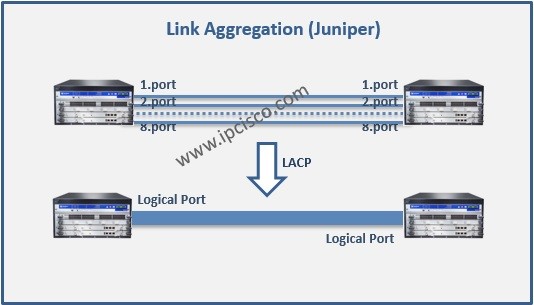
We have talked about LACP in the previous articles on Cisco Routers. Here we will focus on how to do LACP Configuration on Juniper devices on ethernet links. We will learn LACP Configuration on Juniper. As you know the protocol is the same, but there are some configuration differencies between different vendor’s devices. By the way, we do not need to use LACP for ethernet bundlings, this is only a way with LACP protocol. By default, there can be also maximum 8 ports in a bundle on Juniper devices. This can be changed by commands. The typical usage of the LAG is to aggregate trunk links, between the access switch and the distribution switch.
[edit chassis]
gk@switch# set aggregated-devices interfaces device-count 1
After creating aggregated Ethernet interfaces, it is time to define minimum link count while the bundle is up. To do this use the below command:
[edit interfaces]
gk@switch# set interface-name aggregated-ether-options minimum-links 3
[sc name=”ContentRMessage”]
You can also view the below Link Aggregation Configuration Lessons for different vendors: