


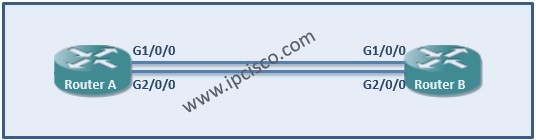
We have learned LACP and Link Aggregation before detailly and in this article we will focus LACP Cisco Configuration. We will make a link aggregation protocol with two ports in one bundle. You can use more port up to 8 ports in Cisco devices.

Link Aggregation on Cisco Devices
On RouterA
On RouterA
RouterA> enable RouterA# configure terminal RouterA (config)# interface port-channel 1 RouterA (config-if)# lacp max-bundle 2 RouterA (config-if)# ip address 192.168.0.1 255.255.255.0 RouterA (config-if)# interface g1/0/0 RouterA (config-if)# no ip address RouterA (config-if)# channel-group 1 mode active RouterA (config-if)# exit RouterA (config)# interface g2/0/0 RouterA (config-if)# no ip address RouterA (config-if)# channel-group 1 mode active RouterA (config-if)# end[sc name=”ContentRMessage”] You can also view the below LACP Configuration Lessons for different vendors:




