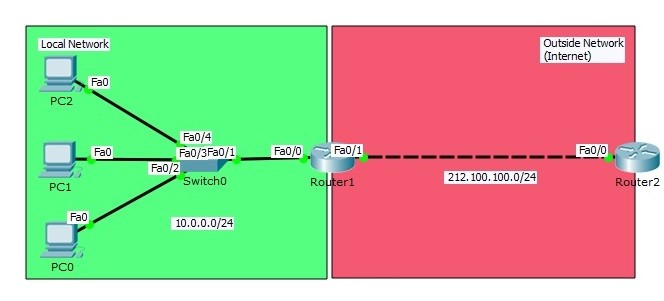
Packet Tracer PAT Configuration Example
In some cases there can be hundreds of inside local addresses and at the same time your Global IP Addresses can be limited. At this time you can use PAT instead of Static and Dynamic NAT translation. Here, we will learn PAT Configuration with Cisco Packet tracer. Here, with PAT (Port Address Translation), we translate each PC to a unique port number of a single public address.
PAT (Port Address Translation) Configuration Topology
Here, we will start with the IP address configurations firstly. Our PCs on Packet Tracer will be configured with below IP addresses. PC0 : 10.0.0.2 255.255.255.0 GW:10.0.0.1 PC1 : 10.0.0.3 255.255.255.0 GW:10.0.0.1 PC2 : 10.0.0.4 255.255.255.0 GW:10.0.0.1Router1(config)# interface FastEthernet0/0 Router1(config-if)# ip address 10.0.0.1 255.255.255.0 Router1(config-if)# no shutdown Router1(config-if)# exit Router1(config)# interface FastEthernet0/1 Router1(config-if)# ip address 212.100.100.2 255.255.255.0 Router1(config-if)# no shutdown Router1(config-if)# exit
Router2(config)# interface FastEthernet0/0 Router2(config-if)# ip address 212.100.100.1 255.255.255.0 Router2(config-if)# no shutdown Router2(config-if)# exit Router2(config)# ip default-gateway 212.100.100.2 Router2(config)# no ip routingNow, let’s do the classical NAT configuration and plus Port Address Translation configuration (overload).
Router1 (config)# interface FastEthernet0/0 Router1 (config-if)# ip nat inside Router1 (config-if)# exit Router1 (config)# interface FastEthernet0/1 Router1 (config-if)# ip nat outside Router1 (config-if)# exitAfter that we will use the below commands for PAT configuration:
Router1 (config)# access-list 10 permit 10.0.0.0 0.0.0.255 Router1 (config)# ip nat pool IPCISCO 50.50.50.80 50.50.50.80 netmask 255.255.255.0 Router1 (config)# ip nat inside source list 10 pool IPCISCO overloadHere, any match interface with access-list 10, will be translated with overload to the outgoing interface IP address of Router 1. The secret key word of PAT configuration is “overload“. Let’s check the nat table on Router1.
Router1# show ip nat translations Pro Inside global Inside local Outside local Outside global icmp 50.50.50.80:1 10.0.0.4:1 212.100.100.1:1 212.100.100.1:1 icmp 50.50.50.80:2 10.0.0.4:2 212.100.100.1:2 212.100.100.1:2 icmp 50.50.50.80:3 10.0.0.4:3 212.100.100.1:3 212.100.100.1:3 icmp 50.50.50.80:4 10.0.0.4:4 212.100.100.1:4 212.100.100.1:4
You can also DOWNLOAD all Packet Tracer examples with .pkt format in Packet Tracer Labs section.
PC0>ping 212.100.100.1 Pinging 212.100.100.1 with 32 bytes of data: Reply from 212.100.100.1: bytes=32 time=1ms TTL=254 Reply from 212.100.100.1: bytes=32 time=0ms TTL=254 Reply from 212.100.100.1: bytes=32 time=0ms TTL=254 Reply from 212.100.100.1: bytes=32 time=1ms TTL=254 Ping statistics for 212.100.100.1: Packets: Sent = 4, Received = 4, Lost = 0 (0% loss), Approximate round trip times in milli-seconds: Minimum = 0ms, Maximum = 1ms, Average = 0ms
Router1# debug ip nat IP NAT debugging is on Router1# NAT: s=10.0.0.2->50.50.50.80, d=212.100.100.1 [9] NAT*: s=212.100.100.1, d=50.50.50.80->10.0.0.2 [32] NAT: s=10.0.0.2->50.50.50.80, d=212.100.100.1 [10] NAT*: s=212.100.100.1, d=50.50.50.80->10.0.0.2 [33] NAT: s=10.0.0.2->50.50.50.80, d=212.100.100.1 [11] NAT*: s=212.100.100.1, d=50.50.50.80->10.0.0.2 [34] Router1# NAT: s=10.0.0.2->50.50.50.80, d=212.100.100.1 [12] NAT*: s=212.100.100.1, d=50.50.50.80->10.0.0.2 [35]
PC1>ping 212.100.100.1 Pinging 212.100.100.1 with 32 bytes of data: Reply from 212.100.100.1: bytes=32 time=1ms TTL=254 Reply from 212.100.100.1: bytes=32 time=0ms TTL=254 Reply from 212.100.100.1: bytes=32 time=0ms TTL=254 Reply from 212.100.100.1: bytes=32 time=0ms TTL=254 Ping statistics for 212.100.100.1: Packets: Sent = 4, Received = 4, Lost = 0 (0% loss), Approximate round trip times in milli-seconds: Minimum = 0ms, Maximum = 1ms, Average = 0ms
Router1# NAT: s=10.0.0.3->50.50.50.80, d=212.100.100.1 [7] NAT*: s=212.100.100.1, d=50.50.50.80->10.0.0.3 [42] NAT: s=10.0.0.3->50.50.50.80, d=212.100.100.1 [8] NAT*: s=212.100.100.1, d=50.50.50.80->10.0.0.3 [43] …
PC2>ping 212.100.100.1 Pinging 212.100.100.1 with 32 bytes of data: Reply from 212.100.100.1: bytes=32 time=1ms TTL=254 Reply from 212.100.100.1: bytes=32 time=11ms TTL=254 Reply from 212.100.100.1: bytes=32 time=0ms TTL=254 Reply from 212.100.100.1: bytes=32 time=0ms TTL=254 Ping statistics for 212.100.100.1: Packets: Sent = 4, Received = 4, Lost = 0 (0% loss), Approximate round trip times in milli-seconds: Minimum = 0ms, Maximum = 11ms, Average = 3ms
Router1# NAT: s=10.0.0.4->50.50.50.80, d=212.100.100.1 [23] NAT*: s=212.100.100.1, d=50.50.50.80->10.0.0.4 [46] NAT: s=10.0.0.4->50.50.50.80, d=212.100.100.1 [24] NAT*: s=212.100.100.1, d=50.50.50.80->10.0.0.4 [47] …As a summary, PAT is used when you do not have enough public addresses for your inside network’s hosts. With Port Address Translation, you can use one public address and then you can multiple this address with port numbers.